.
I have to weigh spending time building another quick revenue-generating
tool versus delaying my future product.
11/20/2005 10:59:37 AM
I mentioned earlier in my post “Get Your Butt Outta Bed and Build Something” that I would be shipping subproducts before my main product.
My main product (which shall remain secret) is general-purpose desktop application and may attract an audience that requires more hand-holding and is less tolerant of inevitable bugs from a first version release. Quality fears due to size of the product is currently driving my decision to ship different portions of my codebase in smaller subproducts earlier.
This is my current plan:
In my first subproduct, a static analysis tool, I will focus on testing my AI backend. Subsequent subproducts will focus on my other technology such as natural language processing (e.g., kickass grammar checker) and document-editing (e.g., graphical code editors). These subproducts will each have short release cycles; I will release a free lite version and commercial pro version. In contrast to my main product, the subproducts will be targeted to developers, experienced computer users and software businesses, who require less hand-holding and of whom I am also representative. After I have tested and released the various components of my technology, I will incorporate the feedback into my main product.
As I mentioned earlier, I am working on a Static Analysis tool for .NET languages comparable to Spec#, Microsoft’s PreFix/Fast, Java’s FindBugs, and PCLint. I tentatively call it NStatic. I’m looking at a beta release just before Christmas (one month from now).
I could also add possible support for dynamic languages like Ruby and Boo, depending on how inexpensive such extensions are to add and how valuable such support would be to my own build process, which does incorporate dynamic languages. Building a parser for a new language is trivial for me; it’s the additional language services such as a complicated generic type system and method disambiguation that are time killers. On the other hand, adding more language support is a distraction from my main product.
Here’s how static analysis relates to my main product. Programming languages are much simpler to parse, analyze and work with than natural language and provide a natural intermediate step toward the real thing. Programs of different languages are parsed into a common universal expression language, which also makes it trivial to convert code from one languages to another a la CodeDom. I also capture syntactical elements such as comments and preprocessing instructions. This is the same representation that will be used for my natural language expressions.
The tool tests my AI backend, and the time investment in building this tool is low on top of my existing codebase. I also have prior experience from writing another much simpler static analysis tool for C++/C, CStatic, several years ago, based on symbolic pattern matching. I submitted that command line tool to the Larkware Contest after a simple recompile to Visual Studio 2005, to see if I could win a prize by default—unfortunately, no such luck; I think the judges had a bias for graphical interfaces. (Larkware is a good example of a tastefully done commercial blog.)
My upcoming NStatic tool is different from most other static analysis tools in several ways:
These are typically hard to do but, with the right backend, can be straightforward to implement. Some features could be dropped before beta.
There aren’t any good static analysis tools for .NET, and what I am offering should be smarter than many commercial implementations. I haven’t checked out Team System, but the free version of FXCop appears to be mostly a style checker. Given that static analysis tools are already commercially successful, I should be able to command a good price.
There are many options for delivering a free lite and a paid pro version of the tool. For instance, my tool can produce good results in seconds, but, if it is allowed to run continuously for days or weeks, it would explore more of the abstract state space of the program and uncover more difficult-to-find bugs.
12/18/2005 09:06:22 PM
As I am mentioned in my post on Static Analysis, I am working on a static analysis called NStatic, which behaves more intelligently than most code analysis tools out in the market. More details in upcoming posts. I have already registered the domain name, “NStatic.com.”
This isn’t actually the main product of my software company, but one of a series of small “smart” products that are based on some of technology of my main product. In keeping with the various “NProduct” family of products, there will a very functional free version, but also a commercial version to fund my endeavors.
My main product is a smart wordprocessor-like desktop application that will enable people to write documents ten times faster through AI. The software is like a “soft person,” a ghost writer (an agent in AI parlance) that deals with the mechanics of writing, while the users concentrates on ideas. The product focuses on content rather than presentation and layout, which is the emphasis of current wordprocessors today. A wordprocessor that thinks of a document in units of discourse (such as sentences and paragraphs) instead of meaningless characters can allow users to “pivot” and manipulate unstructured text. Hopefully, the generality of my approach will wipe out the current crop of specialty content-oriented wordprocessors and template software.
I see various benefits from releasing NStatic and other spinoff products, despite the delay to my main product.
I will try to get an incomplete version out at the end of this week before vacationing at my parents’ home for the Christmas and New Year holidays. This version will be in limited beta; if you are interested in testing it, please drop me an email. This version will only read C# files.
The user interface is mostly complete now, and I will eventually post a screenshot after I have fixed the graphics. The user interface for the free version will include a Visual Studio-like start page, which points to http://NStatic.com, which will most likely be a NStatic-specific blog site.
After NStatic, I have some options. I could quickly build a code
converter from the NStatic codebase. The code converter would also share
the same user interface. I would then have two products generating
revenue, but the second tool would not directly advance the testing and
development of my main product. It would be about a two-weeks
incremental investment of time in development and testing to implement
the code conversion tool to and from C#, VB, and a few dynamic
languages; a one-way conversion to C++/CLI is also possible. I
personally need a converter from
Perl
to
Ruby
12/18/2005 10:07:03 PM
In my post, Static Analysis, George Tsiokos requests for feature…
Feature request: Exceptions! I’m looking for a static analysis tool that can tell me all possible exceptions for an object’s method call, constructor, etc. I would also like details on the code-path that generates the exception and not have specific ties to a specific framework version (so I could run an analysis of App X against .NET 1.1). From this post, it seems this should not be difficult for this tool to report.
The feature request is actually one of the main features of my static analysis tool. The .NET Framework makes it easy for analysis tools to detect errors by its ubiquitous use of exceptions and parameter validation. Scanning the Rotor sources or the framework’s IL is necessary for the tool.
For example, the following code is Microsoft’s implementation of String.ToCharArray:
public char[] ToCharArray(int startIndex, int length)
{
  // Range check everything.
  if (startIndex < 0 || startIndex > Length || startIndex > Length - length)
     throw new ArgumentOutOfRangeException("startIndex", Environment.GetResourceString("ArgumentOutOfRange_Index"));
  if (length < 0)
     throw new ArgumentOutOfRangeException("length", Environment.GetResourceString("ArgumentOutOfRange_Index"));

  char[] chars = new char[length];
  InternalCopyTo(startIndex, chars, 0, length);
  return chars;
}
My tool would detect the two exceptions above and impose the if conditions as mandatory requirements on callers of this function. In addition, the exception’s message is captured and evaluated as an expression and outputted to the error log.
array = s.ToCharArray(s.Length-count, count+1);The tool would generate an error for the code above, because the expression is guaranteed to generate an exception.
In addition, any parameter that is dereferenced imposes a nonnull restriction, and any array parameter that is indexed imposes two requirement on the index—index >= 0 && length < param.Length.
The tool records all assumptions made before reaching an exception. If an assumption is redundant or contradictory, errors are also emitted.
if (X == Y + Z)
{
  if (3*Y == 3*(X - Z))
    ....;
}
if (X*X - 6X < -9)
{
if (X == 4)
....;
}In the first example, the second if statement is redundant, using essentially the same condition as the first, albeit in different form.
In the second example, X = 4 is not a solution to inequality presented by the first condition, therefore, the second condition always returns false and the body of that if statement will never be executed.
01/08/2006 05:14:39 AM
My main gripe with Microsoft is that the company doesn’t know how to write “smart” software. (Much of the industry doesn’t either, but, since Microsoft is the leader…)
The current tendency among software developers is to determine the minimum work needed that can be done to help users. This is a sensible strategy driven by short-term business concerns. A more ambitious developer would ask what more could be done—what can humans still do (or do better) that computer programs yet can’t.
Microsoft invented “Intellisense,” in which an application attempts to
behave intelligently while observing a user’s actions. Intellisense uses
a set of heuristics that more or less work without a real understanding
of the document. However, heuristics offer no guarantees to correctness,
so Intellisense often works unpredictably or produces errors, which
sometimes forces the user to waste time undoing the error. These errors
are in all of Microsoft’s products, but they are more common in Office
than in Visual Studio, because Microsoft
Office
In contrast to Intellisense, “Intelligence” requires a genuine understanding of the document. This often consumes more time and memory. However, the benefits are significant: Since Intelligence performs deeper analysis and guarantees correctness, it can be used reliably to perform major transformations of the document like refactoring, whereas Intellisense, in contrast, is typically limited to auto-correction, limited auto-formatting, and auto-completion. To offset the additional processing overhead, Intelligence offloads “higher-level” work from the user and takes advantage of computer’s ability to outperform users in tedious, repetitive or brute-force activities.
Intellisense typically requires hundreds of adhoc rules to find errors, mostly of a trivial nature. With Intelligence, a general purpose algorithm that has some genuine understanding of the document could perform the function of hundreds of rules. Whereas Intellisense utilizes specific rules, Intelligence focuses on general principles.
In my tool, NStatic, I strive for Intelligence over Intellisense. I continually ask myself how far I can take this, attempting to close the gap between errors that only human being can find and those that a computer can find. These are some principles that I code to:
Most analysis tools contain rules that perform some matching at the syntax level. Instead of constructing rules to catch specific instantations where the principles are violated, my tool simulates code execution symbolically and utilizes a constraint solver to find errors in a more general way.
A typical code analysis tool using heuristics may catch the following redundant assignment by checking if the left hand expression matches the right expression.
x = x
This heuristic would produce a false positive if the assignment was x[i++] = x[i++].
An intelligent tool would determine if the right hand side of an assignment evaluates to the value of left hand side before the assignment, such as in the following case.
x = a; y = x + 1; a = y – 1;
A heuristic tool might look for the specific case of the same variable being tested for different values within a conjunction as in the following case:
a == 4 && a == 5
but miss other cases that follow from general principles such as the following
x*x + a * a == 2 a*x && x == a
In trying to bring intelligence to software,
This is how I approached, for example, the problem of determining transitional relationships between sentences in my natural language product. I consulted textbooks on English composition and identified the four general ways that sentences are linked from most explicit to least.
Typically, natural language software focuses only on the first point, which is the use of transitional expressions. All the other points require additional work such as tracking pronoun references, parsing and analyzing sentence structure, or utilizing an ontology. Some researchers remarked that it was not possible to accurately determine transitions between clauses and sentences. I disagreed from my belief that if a human can deduce a relationship, a computer should also be able to. These researchers also developed their software under limited available knowledge (ie, without a dictionary backend).
There are still possible avenues of improvement in my upcoming static analysis tool. One area that humans best computers is in recognizing natural language within code. Since I have a library of natural language routines, I have asked myself if I could incorporate natural language understanding to locate another class of bugs that have previous eluded analysis tools.
01/16/2006 02:24:23 PM
I wanted to get this application out for private beta testing before Christmas, before I embarked on my two-week vacation at my parents’ home in New York. However, I didn’t like having to write a lot of rules that embodied just a few general principles, and I realize that I could generalize the software as mentioned in my post “Intelligence versus Intellisense” and throw out the rules. So, I rewrote some of my algorithms in the past week since I arrived home and am currently testing my software. My biggest concerns right now are
I noticed that having a near term release schedule makes me more efficient in my development. For example, I have shifted my focus to producing the minimal software that works for the first release. “Keep it simple, stupid.”
While I started with support for both C# and VB.NET, the initial version will only support C#, because of high code churn and the additional drag introduced by supporting multiple languages. While working through the VB 8.0 specification, I encountered numerous differences between the two languages; while I accounted for many of these differences, when my analysis tool does process VB code, it interprets much of the code using C# semantics especially in subtler matters like method resolution and conversion. Normally, the same operator in two different languages doesn’t exhibit identical behavior, so I typically map the operator to another function in situations that would cause the behavior to be different.
The text editor component I initially used was quirky, so I purchased another more Visual-Studio conformant editor from ActiPro Software for $300+.
In a few weeks, I will do a limited release to selected beta testers, who have emailed me earlier. I learned from the Shareware Industry Conference, that limited betas are more effective than public betas. Regular correspondence with a few beta testers is preferable to no correspondence with a large set.
After incorporating initial feedback and refining my product, I will send it out for a public beta for a few months, after which I will offer a feature-full free version and a more advanced commercial version. Depending on the reception of the commercial product, I may add more features and language support; adding an additional language support is especially cheap.
I am willing to spend a bit more time on this product, since this will likely pay for my living expenses for the next year as well as expose me sooner to the real world details of software marketing. Plus, the underlying technology, which also forms an important part of my other products, will mature rapidly.
02/08/2006 02:00:07 AM
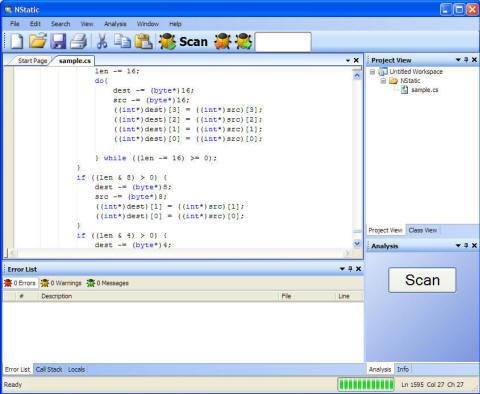
There are hundreds of little issues to take care of before delivering a product… This is almost an endurance test. I think that I know how a new mother must feel going through labor.
My product is GUI-only, which may be a problem for command-line folks. Command-line output is complicated by the fact that some errors span multiple lines and functions.
I am currently deciding where the optimal placement of the “Scan” button (the most important button in the product) and the progress bar should be.
If I place it in the toolbar, it seems that I would have to make the toolbar twice as large, with maybe bold text to highlight its location. This does make all the other buttons larger with less room for other standard buttons for editing source files.
I could also place the scan button in a separate docking pane, but then I lose real estate that could be use for providing additional information. I also explored placing the progress bar in the status bar.
In the picture above, I have shown both scenarios.
02/25/2006 05:28:12 PM
This is the current user interface of NStatic. By the time, the user interface will undergo additional changes before I release it.
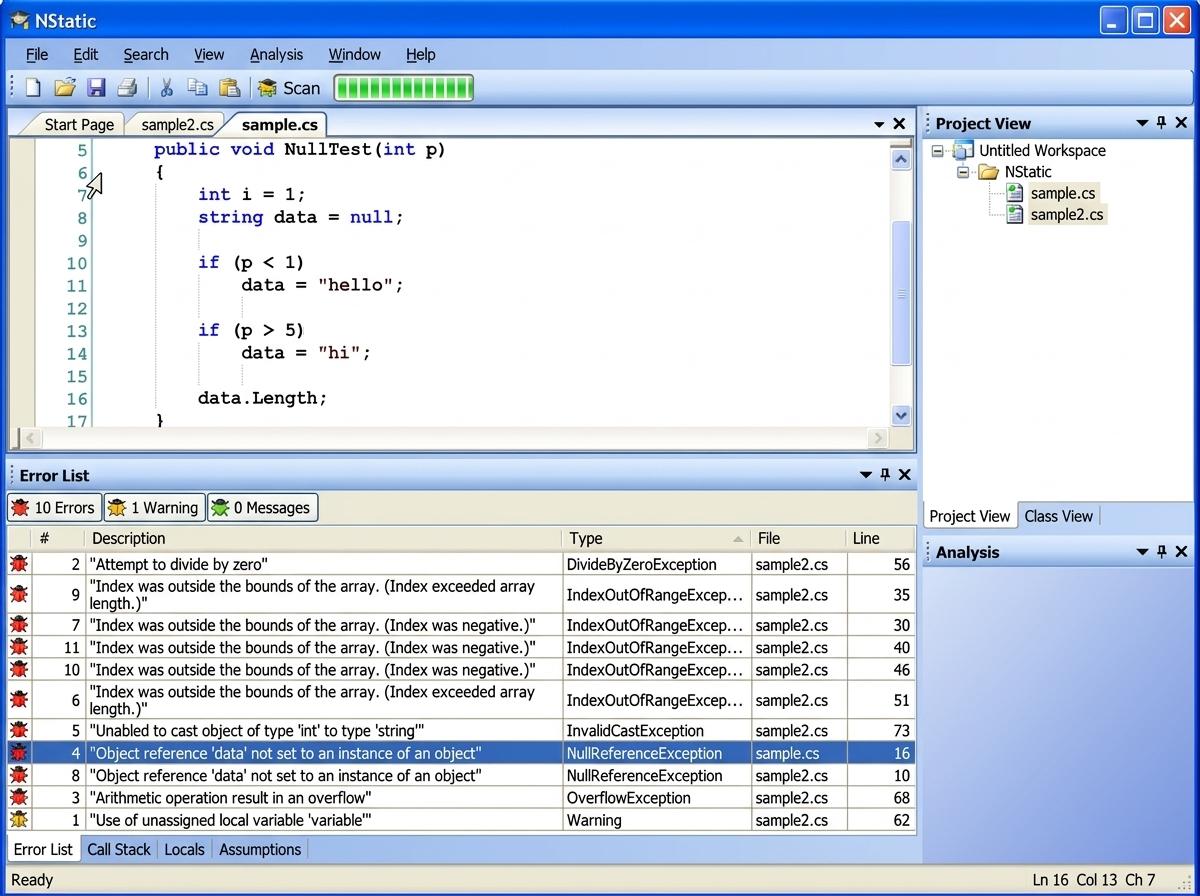
The tool is capable of analyzing code in isolation and handling ambiguities due to incomplete information (such as whether a symbol is a type or a variable). In this example, there are two files being analyzed: Sample.cs and Sample2.cs.
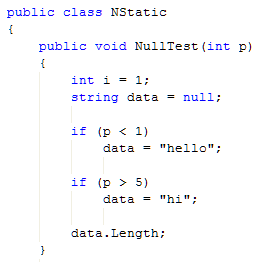
The snapshot for Sample.cs is shown above and Sample2.cs is available as a File Attachment. Together, these two files produce the 10 errors and 1 warning in the Error List pane shown here.
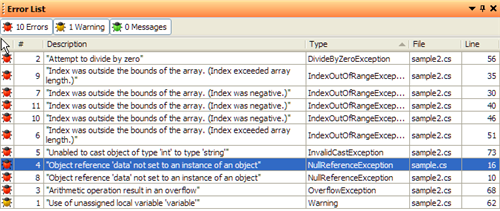
In this window, the error produced from the code displayed earlier is currently selected. The error messages are meant to be identical to the ones that would ordinarily occur at runtime, but, in some cases, for the standard exceptions automatically generated by the runtime, I have added additional explanatory text (such as whether an out-of-bounds index was negative or too high). For custom exceptions, NStatic will dynamically evaluate and construct the exception and then extract the message contained inside.
Besides the Error List pane, there are three additional panes: the Call Stack Pane, the Locals Pane, and the Assumptions Pane.
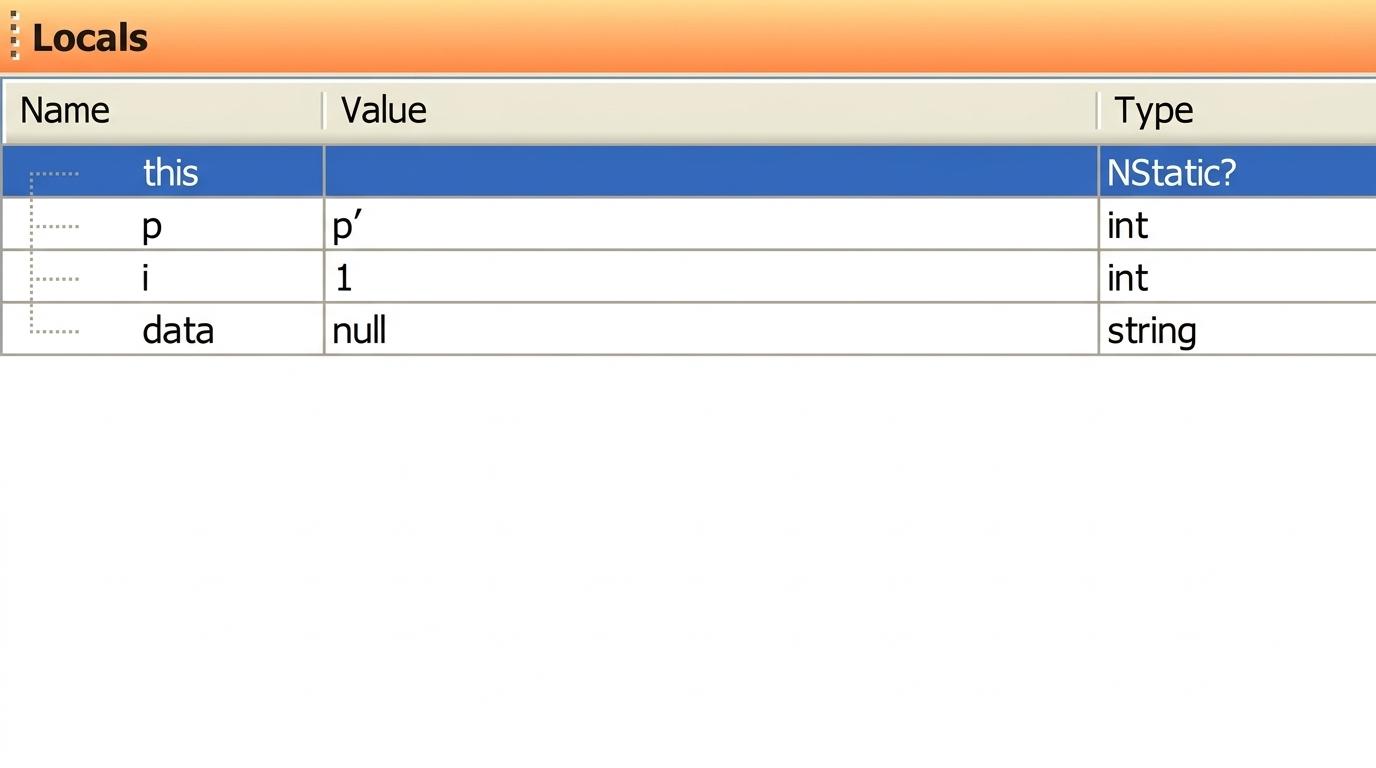
The Call Stack Pane reveals the call stack at the time the error occurred. The Locals Pane above contains a hierarchical tree grid that reveals the values of each of the locals (and instance members) at the time the error occurred, expressed symbolically in terms of the original function parameters (include the this parameter). These expressions may contain constant values (including user-defined object instances) and function bindings. The value p’ reflects the original value of parameter p, since the variable p may change at any time.
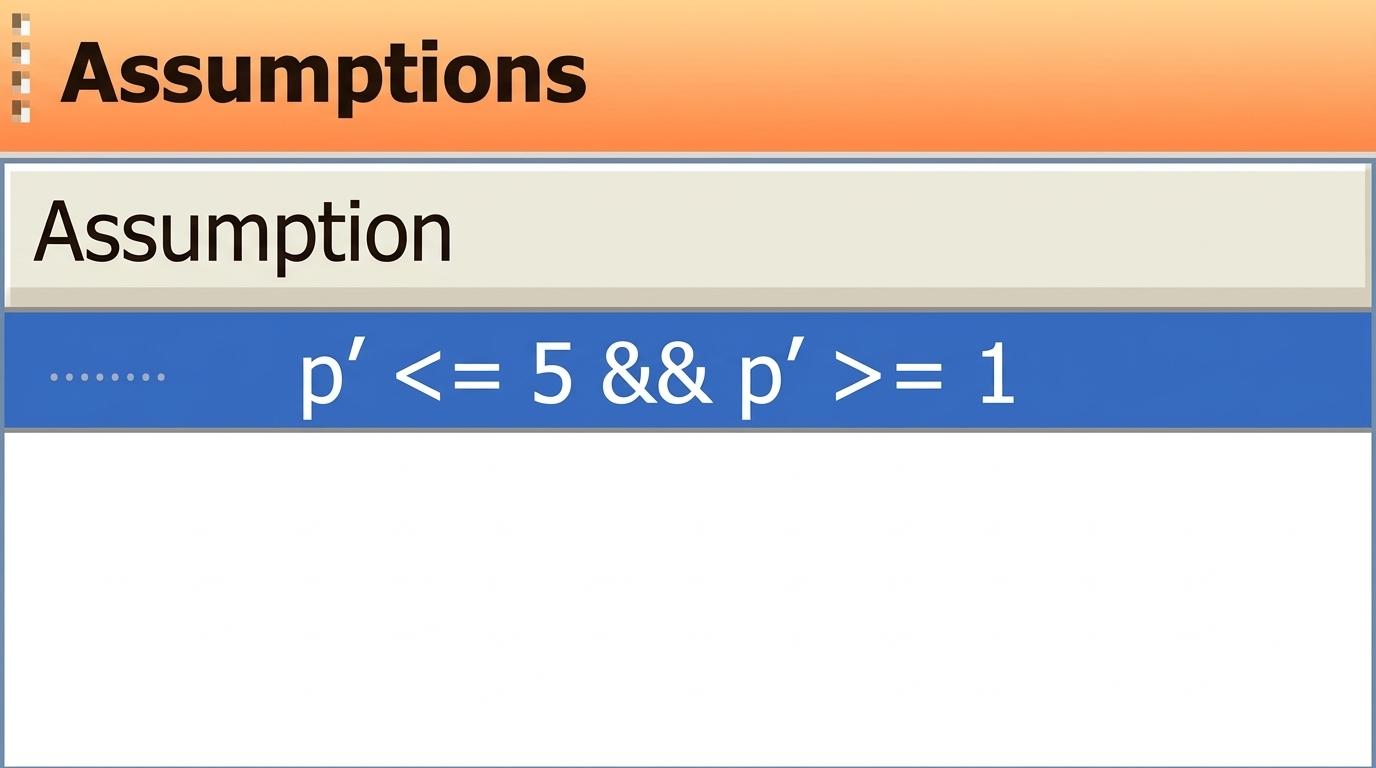
The Assumptions Pane reveals the working assumptions the compiler relied on upon reaching the error. In this case, there is only one set of assumptions.
02/25/2006 07:42:58 PM
Last year after attending the Shareware Industry Conferences, I was surprised how much people were able to make with one or two products. TechSmith supports over 100 employees with two products, SnagIt and Camtasia. Another developer sells a product, which is extremely narrow and technologically basic yet generates over $200K a year in net income.
I look at this static analysis tool, which is actually a diversion from my main pursuit, and see rich possibilities. It’s becoming a more interesting product than I envisioned. Right now, I am looking at offering three different products, one free version and two commercial versions. Of the commercial versions, I would only have to sell a few thousand to actually generate a million in revenues (which doesn’t seem that difficult). The free version allows me to engage in interesting marketing tactics, build awareness, and charge somewhat higher for the commercial versions (399 is currently what I am looking at). Upgrading from the intermediate to the higher-end commercial version will be a straightforward difference. There won’t be an evaluation period for the commercial versions, but I will probably offer 60–day money-back guarantees. Bloggers will probably get a special offer.
The free product will likely have parameter validation for the base class library, and the commercial versions will probably sport validation for all of WindowsForms, WebForms, and the upcoming WinFX API. The commercial versions will have more detailed error information as well. The high-end product will probably have the ability to add customized rules and API specifications, command-line versions, and XML output. I’ll most likely offer free upgrades to version 2.0.
I noted some limitations of my product in an earlier blog post. Most of the limitations have since been removed. I was able to add complete support for static typing in my underlying interpreter and also distinguish between C# and Visual Basic semantics. The floating-point limitation still remains, but I may eventually address this limitation with support for big integers, big decimals and rational numbers.
03/17/2006 09:34:19 AM
I found an paper on nested/recursive iterators by Bart Jacobs, Erik Meijer, et al.
Erik Meijer was involved in the COmega project, which directly led to LINQ-based extensions in C# 3.0 and VB 9.0.
COmega had sequences, which were flattened versions of IEnumerable collections. Sequences introduced a new notion of cardinality into the type systems. A type T could by nullable ( T? ), nonnullable (T!), singleton (T), sequence ( T* ) or nonnullable sequence ( T+ ). A type of one cardinality could be implicitly converted to a type of another cardinality, provided it makes sense, so a singleton was automatically a sequence.
Sequences are fascinating, but would have introduced additional complexity such as major changes to the type system and to syntax would be required. The only real features that sequences added over enumerable collections were flattening and implicit conversions from non-sequences to sequences.
I wasn’t convinced of the rationale for flattening. (Sequence flattening is a major concept in XQuery and XPath 2.0.) They seemed to be useful for type lifting, but the compiler could always special-case type-lifting of collections, so flattening wasn’t strict necessary. Flattening corresponds to the use of SelectMany versus Select operator in LINQ.
The paper did reveal another potential advantage of sequences in their ability to offer linear time enumerations of recursive iterators. The paper remarked that the existing implementation of C# iterators tend to lead to quadratic worst-case running time for recursive iteration of trees. The authors provided an implementation of sequences in the paper that could eliminate that cost.
I was concerned about that paper because I use recursive iterators rather frequently. I noted in an earlier post that recursive iterators can run in linearithmic (n log n) time for traversal of binary trees. I thought the authors of the paper were mistaken, until I noticed a chart clearly demonstrating empirically quadratic time behavior.
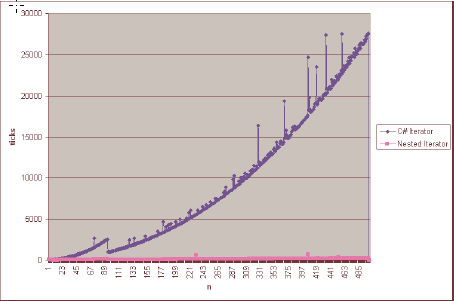
Initially, I couldn’t explain why recursive iterators must lead to quadratic time behavior. Traversal time should be proportional to the size of the collection times the average call depth; for a balanced binary tree, the depth would be a logarithic function of n. Then, I realized that the authors used an n-ary tree and more complicated iterator for traversing their tree.
So, I ran a few of my own tests on the recursive iterator in my earlier post, worked some numbers in Excel and produced a chart:
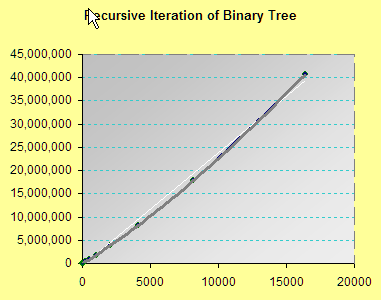
The X axis refers to the collection time N and the Y axis refers to total time spent recursively iterating through the binary-tree collection. The data points are fitted with a cubic polynomial; the straight line regression curve is given in white. I did some analysis. The curve fits the function y = 583 * n * log(n) very neatly. Correlation was 99.9% for a linearithmic curve versus 95.4% for a quadratic curve — about 50 times better.
03/29/2006 09:54:17 AM
I am a fan of Inductive User Interfaces, which I have written about in the past. Inductive UIs become more prominent in Windows Vista, but already ubiquitous in various application categories such as utilities (anti-virus, anti-spyware) and tax software.
Some may think of Inductive UI as a dumbed-down wizard-based interface. Others more accurately accurately call it task-based orientation.
I think of UI as a web-style interface:
I don’t think Inductive UI is necessarily for novice users. It is actually beneficial for advanced users, especially if it allows the user to quickly drill down to detailed options.
In my NStatic product, I remove the Scan button from the toolbar and moved into its own separate window based on Inductive UI. (The Scan option is also available from the Menu and through the F5 key).
The scan window includes multiple pages, three of which are shown below. All three pages can be navigated to at any time, but automatic navigation occurs whenever a scan is started or completed.
The first page consists of a Scan button and two menus (whose names will in the future match the options selected in the menu.)
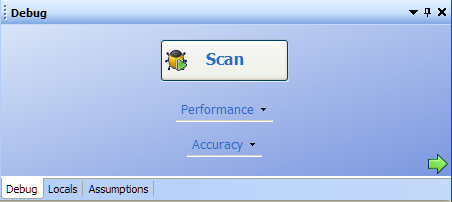
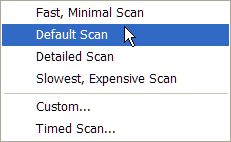
The “Performance” menu enables the user to choose length and detail of the scan desired, with four predefined scans and a general Custom option where all the parameters can be tweaked.
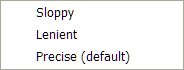
The “Accuracy” menu enables the user to select a very precise scan (with no false positives) or a very lax scan (which will find many more errors, but also introduce more false positives). The lax scan makes certain lax assumptions (when the analyzer encounters a restriction such as maximum function depth that limits analysis in order to perform in a reasonable amount of time) such as functions with the same arguments always return the same results.
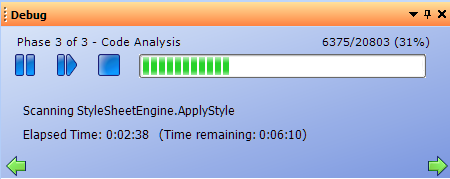
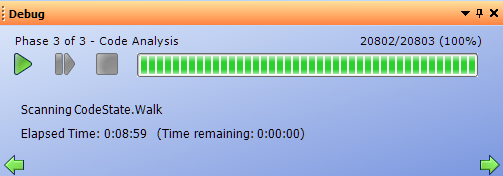
Once the scan has been initiated, page 2 of the scan window, the “Progress” page is displayed.
When the progress page is hidden, its contents minimize into the status bar where the progress bar and the current scan test is displayed. A split button is also included when the whole scan window is hidden to quickly bring up the scan window or to start or stop a scan.

After the scan is completed, a third page of the scan window is displayed.
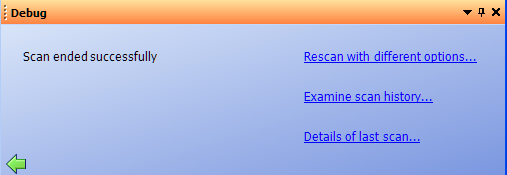
To demonstrate the non-modality of this window, it is possible to go back to any of the previous pages by clicking on the back and forward arrows on each of the pages. For instance, here is how the progress page looks after the scan.
03/31/2006 08:24:34 PM
In order to make NStatic easier for novice users, I added a proven help concept that has previously shipped in the world’s most popular applications and operating system.
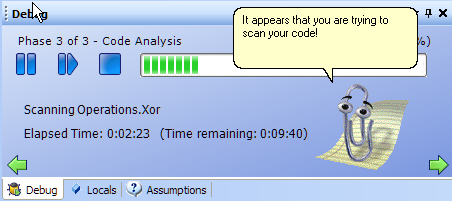
Above is Clippy, who is always willing to lend a helping hand, whenever he thinks the user is encountering difficulties. Clippy is very recognizable.
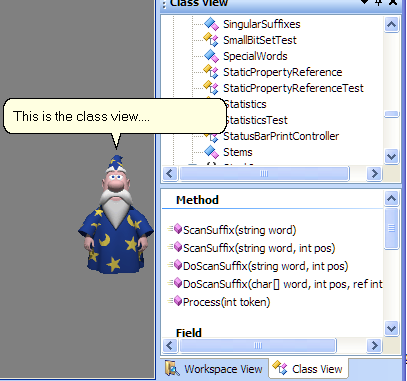
However, I am somewhat more partial to the wizard, who I think adds much more seriousness to the application.
Which character do you think is better? Let me know your opinions and I will get back to you with my decision tomorrow, April 1st.
03/31/2006 05:41:21 PM
Spec# is an experimental specifications-base version of the C# programming language designed by Microsoft Research. Previous languages like Eiffel included specifications, which were converted to run-time checks. Spec# includes an automatic program verifier called Boogie that checks specifications statically.
NStatic is similar to Spec# cum Boogie in its capabilities; I do not know whose engine is richer. It is different in that specifications in Spec# are explicit, while those used by NStatic are automatically inferred from the code itself. Inferred specs can be view from the NStatic user interface.
Although implicit, NStatic already has the ability to work with specifications, and the natural next step is to allow the user to create explicit specifications. To some extent, this can already be done by using Assert function calls.
While it’s a small task for me to modify my C# parser to read in explicit specifications, I’ll probably wait until version 1.5. (All versions 1.X to 2.X will be available as a free upgrade to 1.0, since I don’t have a quality assurance team that can test with usage patterns different from my own.)
I been looking into reusing some of the syntax from Spec# such as requirements, invariants, and checked exceptions. Non-null types would also be supported either through a NonNull attribute or a fully written out requirements clause.
This is what a requirements clause looks like in Spec#.
class ArrayList {
 public virtual void Insert(int index, object value)
  requires 0 <= index && index <= Count;
  requires !IsReadOnly && !IsFixedSize;
I have been thinking about three different forms of adding requirements to code being fed through NStatic. I am thinking of accepting all three as mutually inclusive, alternate ways of adding requirements.
1) The first approach is to enable escaping into Spec# mode through the use of a comment. (//!) When viewed from with the NStatic text editor, special syntax highlighting would be enabled to highlight and syntax check the escaped code.
public virtual void Insert(int index , object value) //! requires 0 <= index && index <= Count; //! requires !IsReadOnly && !IsFixedSize;
2) The second approach is to recognize any user-defined attribute with the name RequiresAttribute, so code could alternatively be written as the following and available through Reflection. The use of Reflection allows specifications to be easily extracted for documentation.
**[Requires(“**0 <= index && index <= Count”)] [Requires(“!IsReadOnly && !IsFixedSize”)] public virtual void Insert(int index , object value)
The RequiresAttribute must be defined by the developer as no libraries will be available to reference from. Using the Conditional(“DEBUG”) attribute on the RequiresAttribute will eliminate the overhead from the release build. (I’ll likely include a sample source file that anyone can include in his project.)
3) A third approach involves the recognition of special function calls, similar to how NStatic currently special-cases any method call involving the method name Assert and Fail, regardless of the class.
public virtual void Insert(int index , object value) **{ MyClass.Requires(0 <= index && index <= Count); ** MyClass.Requires(!IsReadOnly && !IsFixedSize);
The advantage of this approach over the other two is the ability to perform runtime-checks.
The first approach using comments is perhaps redundant, so I may not ultimately use it. I’ll write more about specifications and my rule language later.
04/01/2006 10:08:45 AM
In my previous post on specifications, there were some comments raised on the three approaches to adding requirements.
My tool doesn’t require modification of code. The utility of a utility is increased when no action is required of the utilizer. However, I will allow developers to add additional information.
Omer suggested a fourth option of somehow including specifications with XML comments. This could involve either creating a new tag that may not be picked up by existing documentation generators, or by recognizing a <span> tag with a class attribute around an expression.
The C# compiler already provides the option of collecting XML comments into a single XML file. NStatic could possibly do the same, adding both implicitly generated and explicitly entered specifications to the mix. Other interesting ideas include automatic translation of expressions into natural language.
With regards to run-time checks, it should be possible for NStatic to recreate an existing project with dynamic runtime checks automatically inserted.
I looked at preconditions, but what about other phenomena possible in Spec#.
In these other cases, the third approach of using actual code “MyClass.Requires(constraint)” loses out to comments and attributes. Class-based invariants requires a separate function to house the invariants and repeated code insertions at the start and end of every public method body. Postconditions may require entire method blocks to be wrapped in a try-finally clause. Interface invariants, pre– & post– conditions can’t even use code insertion.
Commented constraints are more readable than attributed constraints, but are not accessible via reflection. Attributes are not composable, so the syntax becomes awkward in certain situations where, for example, a checked exception includes a postcondition, which may itself throw its own exception.
class Student : Person { *** [NonNull]* Transcript t ; … }
With regards to run-time checks, it should be possible for NStatic to recreate an existing project with dynamic runtime checks automatically inserted.
class *ArrayList {
Alternatively, alternatively using attributes we could write in a somewhat less readable way.
[**Requires(“**0 <= index && index <= Count”, **“**ArgumentOutOfRangeException”)] [Requires(“!IsReadOnly && !IsFixedSize”, “NotSupportedException”)] **[Ensures(“**Count == old(Count) + 1”)] **[Ensures(“**value == this[index ]”)] **[Ensures(“**Forall{int i in 0 : index ; old(this[i]) == this[i]}”)] **[Ensures(“*Forall{int i in index : old(Count); old(this[i]) == this[i + 1]}”)] *void Insert(int index , object value)
char Read() //! throws SocketClosedException;
void ReadToken(ArrayList a) //! throws EndOfFileException ensures a.Count == old(a.Count);
interface I { *** void* M(int x ) ** //! requires** x <= 10; }
I actually do have another approach using my rule language based on pattern-matching, but meant for broad classes of errors.
04/23/2006 11:56:45 AM
No tyranny is so irksome as petty tyranny: the officious demands of policemen, government clerks, and electromechanical gadgets. – Edward Abbey
Jeff Atwood writes about making software “considerate,” which lists thirteen different attributes of considerate software. It’s a nice read. In the post, he writes that considerate software …
Most of these attributes are the same ones that I look to when developing “smart software.” Here’s one instance where I make my software more considerate.
Early on, I realized that there was some non-trivial mental effort required to use my software. Once a bug was reported, the developer would have to mentally navigate through multiple branches of code and functions to spot the error.
An important factor in the success of my program is how easily and effortless it is to use. If the output of my program is instantaneously understandable, users are more likely to use it from the start. On the other hand, if significant thinking is involved, users are more likely to dread my software and use it as a last option. In a usability lecture, Mark Miller, of Dev Express (maker of Refactor Pro), observed how instanteneity (measured by minimal use of mouse travel and keystrokes) contributes to the user’s “euphoric high” and enjoyment of the program.
My first attempts at alleviating mental effort was to include a assumptions and locals window, mirroring the same windows found in Visual Studio. I also considered a watch and immediate window in which expressions could be entered and functions could be executed. These windows help by providing context.
Here’s the code from Rotor that we will be looking at. I inserted an explicit null dereference at line 240. (Note that I entered a carriage return on line 231 to wrap the condition to the next line for the screen capture, so all line offsets after 230 are off by one in the various windows.)
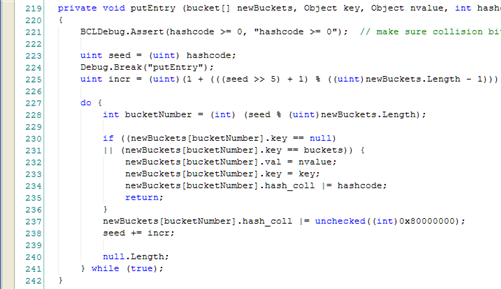
Below is my first attempt at a “Locals” window.
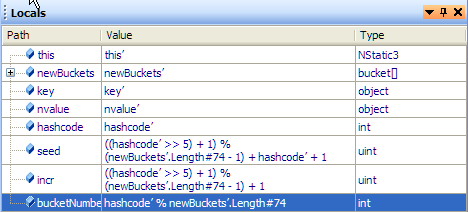
Noticed how the “Locals” window requires a master’s degree to decipher. The values displayed appear in lengthy, cryptic symbolic forms. Parameter values take the name of the parameter passed in, appended with a backquote. Fields and properties values can change over time, and methods can return different values per call, so they are all tagged with unique ids such as “#74” for each unique value.
Here’s how complicated these symbolic expressions can appear using the assumptions window for another function.
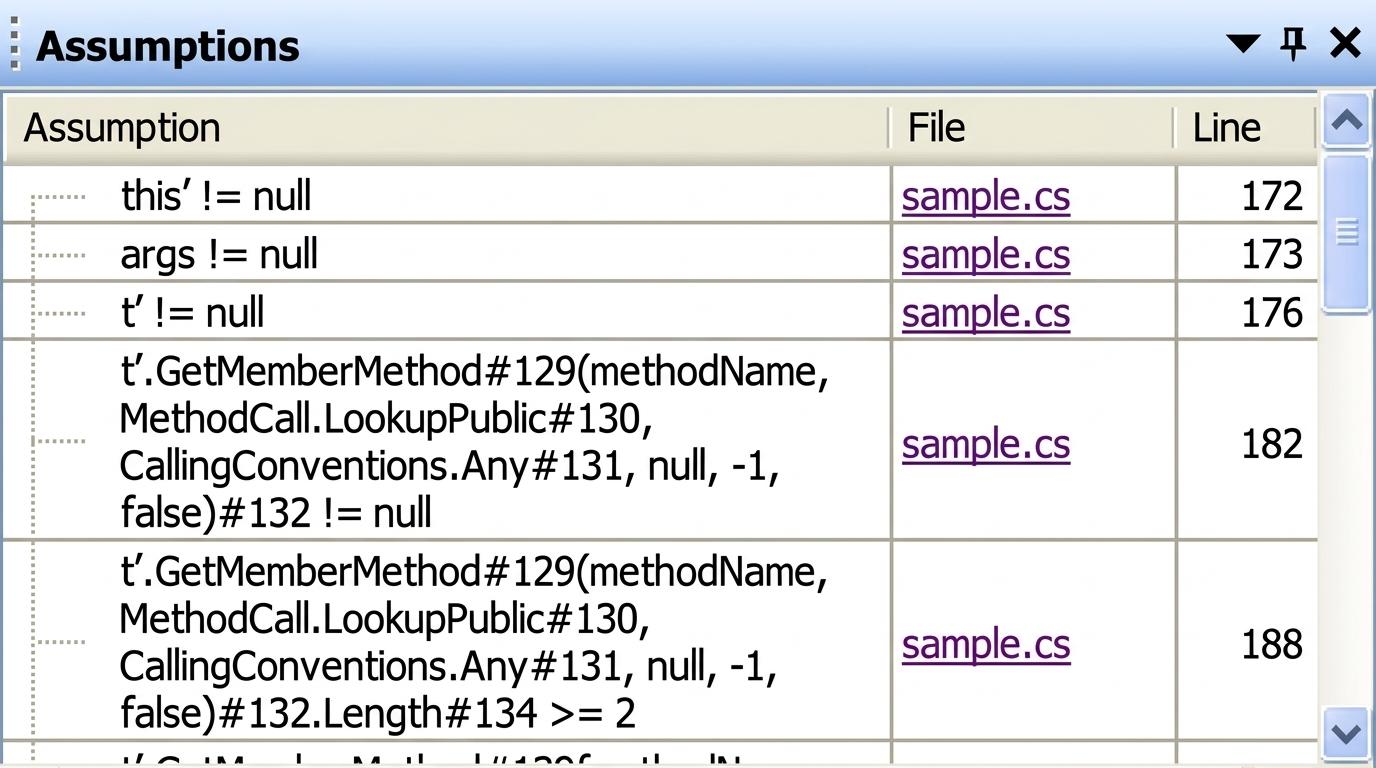
These expressions are likely to hurt the usability of my product, so I decided to display the values in terms of current assignments. For the code above, here’s how the new “Locals” windows appear.
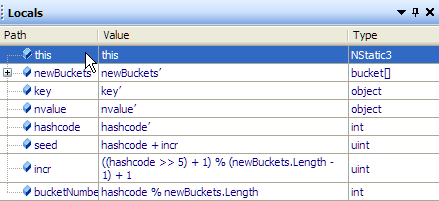
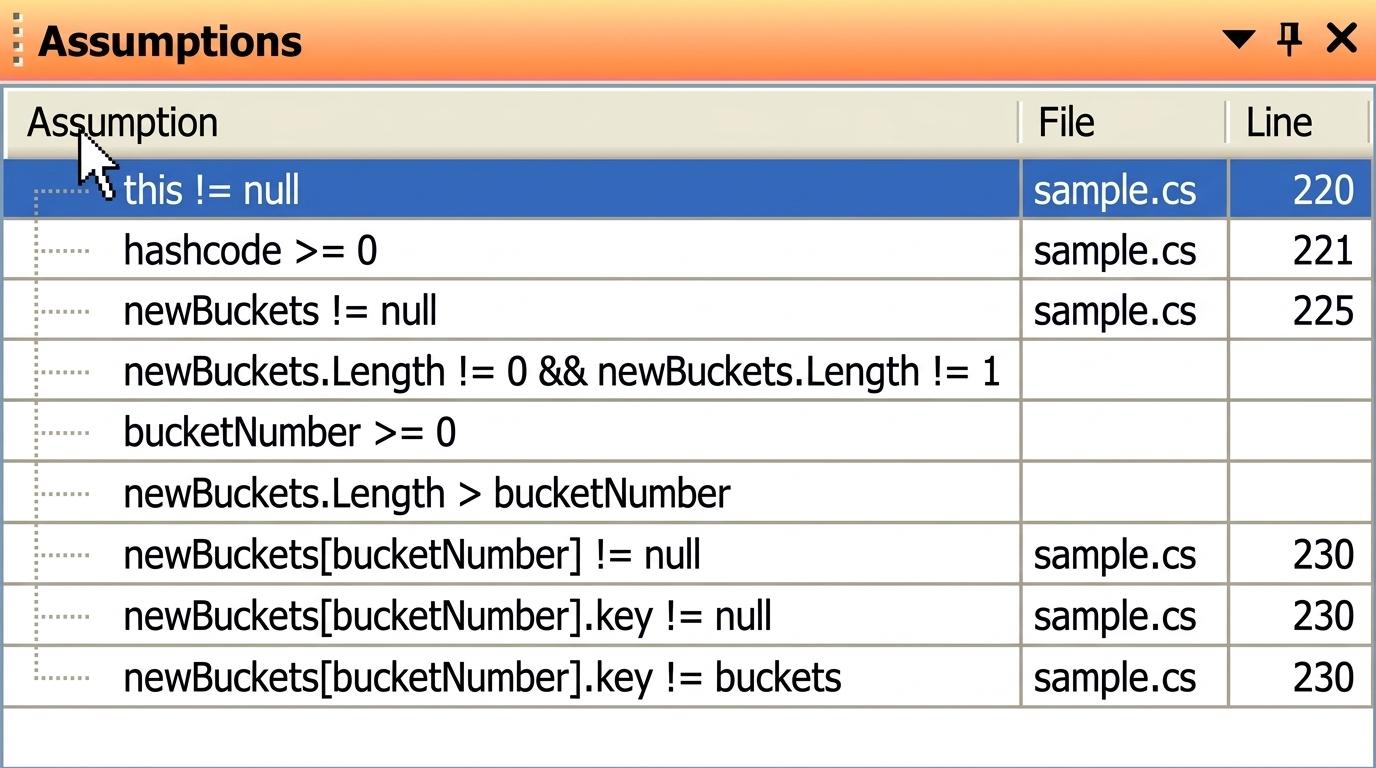
The “Locals” window is now friendlier and instantly readable as is the “Assumptions” window below.
05/04/2006 05:13:24 PM
Excel has a feature called “File/Save Workspaces…” which saves the layout of multiple spreadsheets, so that in the future one can load multiple spreadsheets at once in a preconfigured arrangement. (There’s also a similar feature “Views/Custom Views” which works within a single spreadsheet and preserves a number of view and print settings.)Visual Studio in the late nineties added the concept of solutions, which grouped multiple interdependent projects together into a single file.
Similarly, NStatic has a notion of workspaces in which multiple files, directories, projects/solutions can be grouped into a workspace. Whereas solutions are “meta-projects,” workspaces are “meta-meta-projects.” A workspace also stores scan settings.
The first time NStatic is run, the Workspace View pane presents a task-oriented (inductive UI) interface indicating that workspace is empty and files must be added.
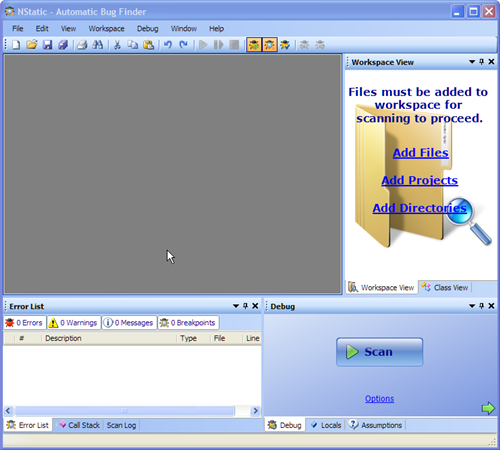
My rationale for doing this is not to lose any users by keeping the user from wading through unfamiliar menus and pointing him to the logical first step. I am not going to make the optimistic assumption that a new user will know what a “workspace” does.
Each successive launch of the application reloads the last workspace (unless a modifier key is pressed.) Most users probably only need to scan one project.
When a project or solution is added, only those source files included in the project are added as are any references.
When a directory is added, all of the files below that directory and subdirectories are added for scanning, but any file can be excluded by manually. Although not required for scanning, any references to dependent non-system (or older system) assemblies have to be added manually. Individual files can be added individually.
References to certain .NET 2.0 system assemblies are automatically detected and loaded when its matching namespace is found in a using declaration and if no other reference of the same name has been added to the project. So, any use of the namespace System.Windows.Forms loads the assembly for WinForms. This method isn’t fool proof, since namespaces aren’t actually tied to any specific assembly. Mscorlib and System.dll are automatically loaded.
Below are the menus shown for the File menu and the Workspace menu.

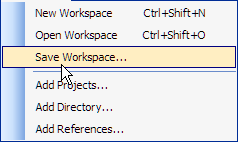
To be honest, I don’t really like the workspace concept much…I am still thinking of removing the concept of workspaces altogether.
Workspaces add a little too much complexity as seen by the double menus. For instance, should opening a file from the File menu add the file to the workspace?
I previously had an “Add File…” item in the workspace menu, which offered two ways to open files from two different menus. The option in the workspace menu both opened the file and added it to the workspace, while the option in file menu simply opened the file is standalone mode. This had to potential for confusion, so I removed the “Add File” option, and simply came up with the rule that opening anything adds it to the workspace.
My other dilemma is whether to use the same file open dialog for loading both projects and files. I can take this a step further and load workspaces and references from the same dialog, in which case I may be able to eliminate the workspace menu altogether.
05/28/2006 07:23:08 AM
I promised that I would deliver the new Office UI that NStatic uses this morning. Unfortunately, I am currently redoing the icons on the ribbon, so you’ll have to wait another day or two. For now, I’ll give you a partial glimpse.
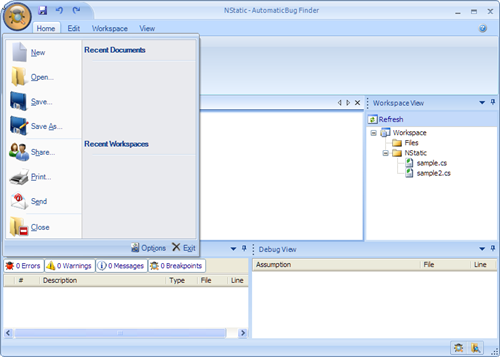
Hopefully, you’ll get your hands on this release late next month.
06/21/2006 02:52:44 AM
Direct UI is the notion of treating a document window as more than just a WYSIWYG display. This includes treating the window as a control surface, inserting various markup, treating document elements as controls, and applying transforms/animations that allow the elements to momentarily transcend their document layout. It’s about making the document come alive.
It’s something that I thought heavily about in building my next document-based application. It’s also one of the reasons why I opted out of using any of Microsoft’s text-editing solutions, because of poor layout extensibility. Avalon text may support render transforms and animations of text, but those options are still too limiting. My NStatic tool also includes some direct UI, which has yet to be revealed, in order to present a more effortless user experience.
In Office, we see documents as a limited control surface with form controls, smart tags, Excel’s drag handle and Office 2007’s floatie. Visual Studio offers a variety of Intellisense controls. Office also includes markup for spelling errors, comments, and change tracking. With the possible exception of PivotTables and Table structures in Excel, document elements, however, are still bound to their layout and don’t typically exhibit control-like behavior. Such a feature typically requires a good understanding of the underlying document.
Refactor Pro probably makes more extensive use of direct UI than any other non-image-processing application. It includes extensive use of markup, in-document controls, and animations.
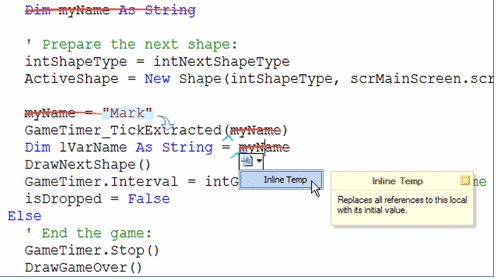
Designed for refactoring, Refactor Pro needs to acquire a fuller understanding of the user’s documents in order to relieve the user of tedious brain work. This also describes the smart applications that I am building. As applications become smarter, they will make greater use of markup and in-document controls.
Why do controls have to be alongside documents, you ask? It’s about moving the operation closer to the operand, eliminating the multi-step process of selection and command searching, interacting in an instantaneous and anticipative way.
I have also written posts about 3D user interfaces as well as a 3D framework that I built on top of GDI+. In addition to increasing realism, 3D interfaces also serve a major function. As more controls accompany documents over time, three-dimensional graphics will allow these controls to produce less clutter as rotation and perspective transformations tend to reduce the amount of screen real estate used.
07/30/2006 04:05:32 AM
It’s been about a month since I last posted, and people are wondering about status of NStatic. I have been setting myself quite a few deadlines in the past for releasing a beta. It’s getting there, but there are some of the issues I encountered.
July has been one of my least productive months as I was distracted by important personal matters, the Shareware Industry conference, and the weeklong impact of the heat wave on my residence with no air-conditioning. The month may also prove to be the most expensive. The first week of August is also likely to be fruitless as I am attending the Lang.Net symposium at Microsoft as well as my cousin’s wedding in Aug 5. Right now, I am planning to impose more discipline.
With a new product based on smarts, it’s hard to predict how well the product will perform in actual usage. I have had to partially rewrite my algorithms at least two times, because the find rate and performance wasn’t there. I noticed that I needed to gather much more information and to address a number of performance issues. I am hoping with this final revision that a full scan of very large program will proceed in a short time — and not hours or days. Most of the changes I made, being improvements to my AI routines, fortunately have general applicability to future programs that I write.
My product is basically an interpreter that that executes each line of code symbolically, branches out into multiple states at each unknown condition and merges regularly to avoid an exponential explosion of code paths explored. This approach allows me to handle a lot of phenomenon easily such as delegates, closures, iterators, gotos, and reflection. It also makes it rather trivial to support features in dynamic languages like Perl such as late-binding, dynamic scoping, and non-local gotos. Potentially large states are efficiently stored in persistent hashtables. Persistent data structures really makes it easy to achieve efficiently the equivalent of time travel and multiple universes in programming.
I recently discovered several tools, ESC/Java, for instance, in addition to Spec#, that perform similar levels of analysis although with a different approach. One of the developers from ESC/Java appears to have left HP to work for Microsoft, possibly in the Spec# group. Both of these programs transform the entire program into an abstract predicate representation which is then analyzed by a theorem prover. I deliberately avoid learning too much about these programs until after I have developing my algorithms, because the static analysis arena is a patent minefield. Quick research indicates that both of these tools are guarded by patents. I did remove a feature in my rules language in response to a Parasoft patent I discovered; this was disconcerting to me as I came up with the same idea in the late nineties before the patent was approved.
There is one thing that I noticed is that all of these tools handle looping constructs poorly, tending to either ignore all variables changed with a loop or abort a method scan in the presence of a loop. I came up with a fairly simple algorithm based on recurrence relations for handling loops in an exact manner.
I going to spend this coming month focused on delivery. This is the current interface (using the black theme); they’ll be a number of additional UI changes.
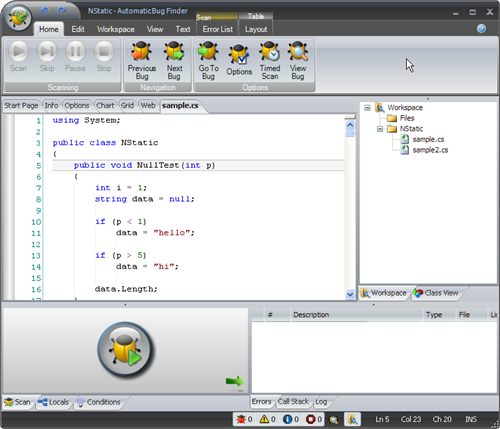
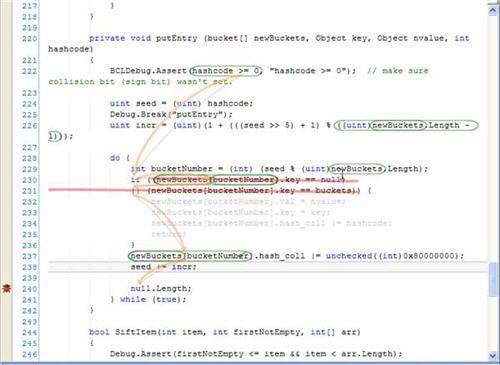
In a previous post, I mentioned the use of Direct-UI. As my build is currently destabilized, I am using an picture from April that I mailed to Judah. This was an early implementation with a lot of display bugs, but it does illustrate a few concepts such as arrows showing the flow of execution, the dimming of untraversed code, and the highlighting of various conditions.
07/30/2006 04:46:39 PM
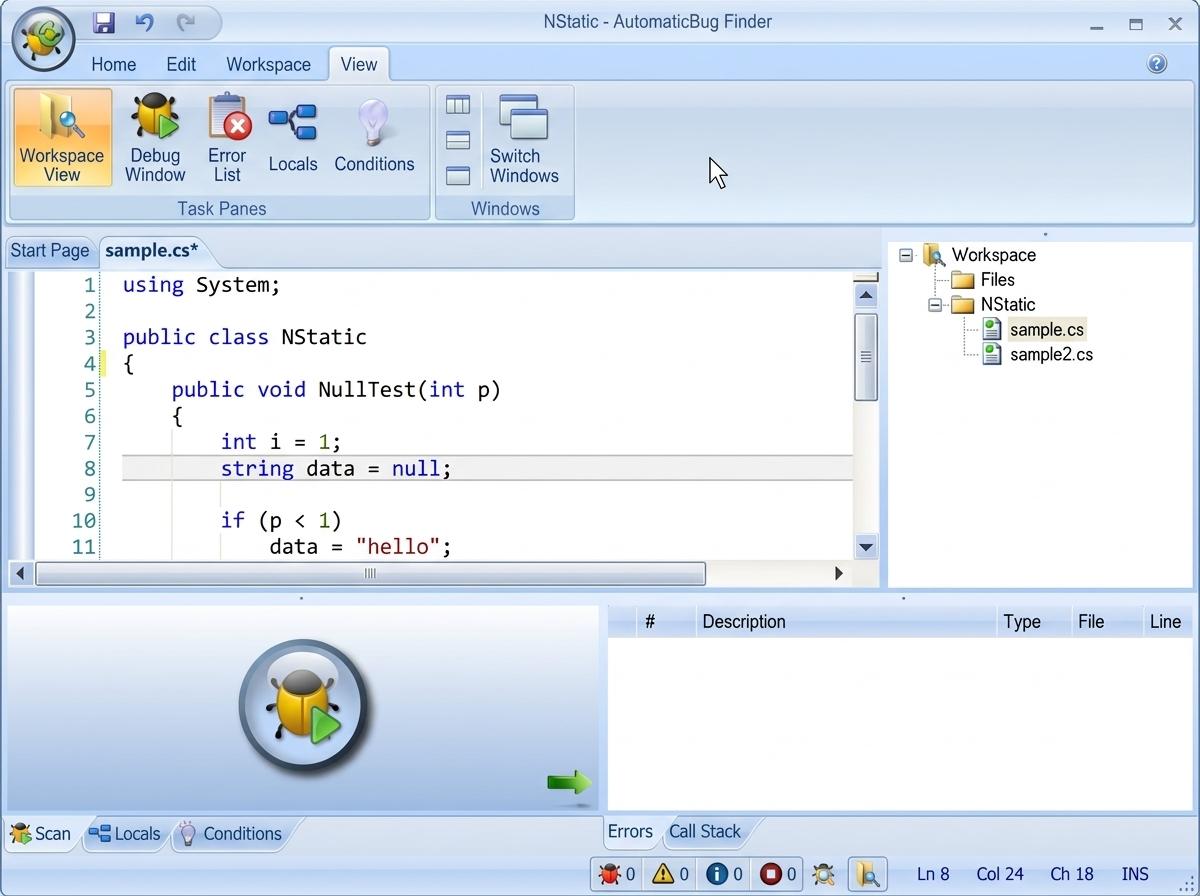
Below is the blue theme that NStatic applications uses.
I just went through removing a number of nonessential features from my product in order to focus on timely delivery of the first version. These features will appear in a later free update, but their presence in the initial version is simply delaying my revenue stream.
This issue of “release early and often” arises frequently in blog posts; some of the more memorable posts I have read on the topic include the following:
Eric Sink answers through his Business of Software series post “Finding Product Ideas” on how long it should take to build the product.
You also want to get to market as quickly as possible. How many months will you need to build version 1.0 of your product? It is usually better to keep the 1.0 feature set as small as possible so you can get your product out in the market sooner. If you can’t get a sellable 1.0 out the door within six months or so, look carefully before you leap.
One of my own personal favorite product ideas has this problem. The market position is good, and I know the product would sell. But it would probably require around two years of full-time effort before I could release version 1.0. That’s a long time to wait for the first dollar of revenue and the first real customer feedback.
Aaron has a contrarian post on Release Late, Release Rarely, supported by Don Dodge’s own view of the evolution of software companies in SaaS delivers functionality faster and cheaper.
07/30/2006 06:24:20 PM
In one of my computer science courses, a professor prefaced his proof on the impossibility of translating from one language to another with the comment: “Next time you are ever asked to write a converter from Pascal to C, consider this.” I immediately thought, skeptically, “while arbitrary translation is impossible in general, translation between C and Pascal is actually trivial, since these two languages are virtually isomorphic.”
I have always been skeptical of the real world applicability of various proofs that place a limit of human knowledge, particularly with Godel’s Incompleteness Theorem in the mathematical realm and with undecidability in the computing realm. The standard proofs typically contain contrived, self-referential arguments. GIT states “this statement cannot be proved” cannot be proved true or false, while the classic undecidability problem, “the Halting Problem,” defines a halt function, which basically determines if any function halts on input, and uses that same function as input.
Such proofs cause people to exclude useful programs like powerful static checkers from consideration, when, in fact, most interesting inputs that occur in practice are solvable.
In this introductory paper “Extended Static Checking for Java” by the developers of ESC/Java, the authors come roughly to the same conclusion:
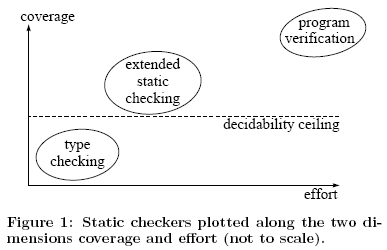
The horizontal line in Figure 1 labeled the “decidability ceiling” reflects the well-known fact that the static detection of many errors of engineering importance (including array bounds errors, null dereferences, etc.) is undecidable. Nevertheless, we aim to catch these errors, since in our engineering experience, they are targets of choice after type errors have been corrected, and the kinds of programs that occur in undecidability proofs rarely occur in practice. To be of value, all a checker needs to do is handle enough simple cases and call attention to the remaining hard cases, which can then be the focus of a manual code review.
Update: Interestingly, the not-so-reliable Wikipedia actually indicates the halting problem is decidable for deterministic machines with finite memory, which pretty much covers all existing computers and puts more wood into the fire.
07/31/2006 01:43:18 PM
I am currently blogging from the Lang.NET symposium, held at the Microsoft campus. There are a number of interesting lectures today about Spec#, IronPython, Ruby.Net, AppleScript, etc, all today; there will even be more tomorrow and the day after.
I have met with Erik Meijer, Haskell coinventer, whose papers I have frequently based my posts on. Erik remarked that he and Paul Vick, VB dev lead, joked that I must have a mole at Microsoft. I plead the fifth and then slowly hid my invisibility cloak from view.
I took him to task for his comment in a channel 9 video in which he believed that we will always need multiple language for different specialized tasks. I believed that with better support for integrated DSLs, we could still actually have a single-uber language for all problems. Amanda, PM in the VB team, was also there.
I met with Anders Hejlsberg, technical fellow at Microsoft, and asked him two of my most pressing questions.
1) Support for declarative programming. I remarked to Anders that C# seems to headed towards greater support for embedded DSLs with the introduction of object initializers and expression trees.
2) Support for symbolic computation in the framework including computer algebra and theorem proving. I inquired whether that the incorporation of expression trees foreshadow such advancements.
In both cases, Anders indicated that, while my ideas are interesting, the focus, for now, was integrated query. Afterwards, Anders stated that he reads my blog and that I had some good posts. A few other attendees recognized my name from my blog.
In addition, I saw other well-known people for the first time, Miguel de Icaza, who heads the Mono project and previously commented about my XAML and standards post, Jim Huginin, developer of IronPython (now in RC1), Christopher Diggins, creator of the Heron and Cat programming language.
08/01/2006 01:05:13 AM
At the Lang.NET Symposium, I met up a member of the Spec# research team, Mike Barnett, shared with him information about the tool I was working on, and gave him my contact information. As I suspected earlier, Rustan Leino, who previously worked at HP/Compaq on ESC/Java, joined Microsoft to work on the Spec# programming system.
I watched an impressive presentation on the tool that included real-time IDE integration and syntax highlighting. Spec# works off of IL with the implication that eventually all the .NET languages will eventually support specifications. Indeed, the presentation was called “Why Every Language Should (Will) have Specifications.”
Spec# requires that all calls to functions with specifications be provably true either through existing conditions within code or by using explicit invariants. In this sense, specifications act like an extended type system and can result in code growth by a substantial percentage; however, the benefit is the decreased need to add in unit tests for boundary conditions. This is quite different from my approach in which any assertions are simply checked not to be violated; as a result, no new syntax is required.
I referred Mike to a paper on ESC/Java that detailed prior experience with using ESC. One issue was annotation overhead. The authors indicated that up to 10% of code would need to include some kind of specification.
ESC/Java is an annotation-based checker, which relies on the programmer to provide annotations giving lightweight specifications for each routine. Thus, one of the costs of using ESC/Java is the overhead of writing the necessary annotations. In most cases, these annotations are straightforward and they document basic design decisions, for example, that a method argument should never be null, or that an integer variable should be a valid index to a particular array.
Our experience in annotating Javafe and Mercator indicates that roughly 40–100 annotations are required per thousand lines of code…
For both of these programs, the annotations were inserted after the program was written using an iterative process: The program was first annotated based on an inspection of the program code and a rough understanding of its behavior; this initial set of annotations was subsequently refined based on feedback produced by ESC/Java when checking the annotated program. Typically, we found that a programmer could annotate 300 to 600 lines of code per hour of an existing, unannotated program. This overhead is expensive for larger programs and is an obstacle to using ESC/Java to catch defects in large, unannotated programs. While it is possible to use ESC/Java only on selected modules, it is still necessary to annotate all the routines called in other modules. We are investigating annotation inference techniques [17, 16] that help reduce the annotation burden on legacy code.
Instead of writing annotations after the program has been developed, a better strategy for using ESC/Java is to write appropriate annotations and run the checker as early as possible in the development cycle, perhaps after writing each method or class. Used in this manner, ESC/Java has the potential to catch errors much earlier than testing, which can only catch errors after the entire program or an appropriate test harness has been written. Since catching errors earlier makes them cheaper to fix, we suggest that using ESC/Java in this manner may reduce software development costs in addition to increasing program reliability.
The experience is familiar to anyone who changes parameters types in an existing interface to incorporate C++ const modifiers or .NET generic constraints.
I did comment about about some of the limits of Spec# with exceptional phenomenon like iterators, closures, virtual functions, etc. According to the Spec# website, the tool is quite sophisticated, being able to deal with callbacks, threads, and inter-object relationships. The Spec# team does not use a closed-world assumption for handling virtual functions, but which actually does make sense for a stand-alone application versus a class library that whose classes could be extended.
I asked him about loop handling and indicated to him how I was using recurrence relations to deal with the problem. Early papers on Spec# indicated that assigned variables within a loop were assigned a havoc value, which essentially means that variables are assumed to contained anything. ESC/Java attempts a different approach.
Therefore, ESC/Java approximates the semantics of loops by unrolling them a fixed number of times and replacing the remaining iterations by code that terminates without ever producing an error. This misses errors that occur only in or after later iterations of a loop…. By default, we unroll loops one and a half times (the half refers to an additional execution of the loop guard):
He seemed to indicate some complicated analysis being done in this area.
Mike entertained questions about decidability from another attendee. Spec# can verify all linear assertions. But nonlinear expressions, like x*y == 5, are not completely handled by the system and therefore could require explicit invariants. For undecidable cases, Spec# includes a timeout and conservatively issues errors in such case.
I also inquired about patents on Spec# mentioning Patent #7,058,925. He wasn’t actually aware of any patents and stated that all the work is actually published. The patent I mentioned was more likely filed by Microsoft research group that produces the SLAM tool, used in Office and Windows. Anyway, he mentioned that Microsoft’s use of patents is primarily defensive (although, Microsoft’s recently announced Windows 12 Principles does talk about reasonable terms in licensing patents.)
10/01/2006 11:38:40 PM
I currently have 29 active bugs in my plate for the NStatic. The noise in my blog has been low, as I have been very busy developing and fixing bugs.
I am thinking of saving all the “Rotor” Shared Source CLI bugs that I find in a list to be published along with a press release on the first day of sale, followed by submissions to sites like Digg, Slashdot, Reddit, etc and well-known bloggers. A title like “.NET Framework has X,000 bugs” would be really provocative and newsworthy, not to mention the unique approach of my software. That way, my website will experience a lot of traffic, my cash register will be ka-chinging a lot, and Microsoft PR will be doing damage control.
My product will initially go into a limited beta… I have about a few dozen people on the list. Then, one of these days, the product will spring up unsuspectingly on you after you have already given up hope.
For now, here is an actual bug in the System.ComponentModel.PropertyTabAttribute class.
private void InitializeArrays(string[] tabClassNames, Type[] tabClasses, PropertyTabScope[] tabScopes) {

    if (tabClasses != null) {
        if (tabScopes != null && tabClasses.Length != tabScopes.Length) {
            throw new ArgumentException(SR.GetString(SR.PropertyTabAttributeArrayLengthMismatch));
        }
        this.tabClasses = (Type[])tabClasses.Clone();
    }
    else if (tabClassNames != null) {
        if (tabScopes != null && tabClasses.Length != tabScopes.Length) {
            throw new ArgumentException(SR.GetString(SR.PropertyTabAttributeArrayLengthMismatch));
        }
        this.tabClassNames = (string[])tabClassNames.Clone();
        this.tabClasses = null;
    }
    else if (this.tabClasses == null && this.tabClassNames == null) {
        throw new ArgumentException(SR.GetString(SR.PropertyTabAttributeParamsBothNull));
    }

...10/23/2006 10:14:30 AM
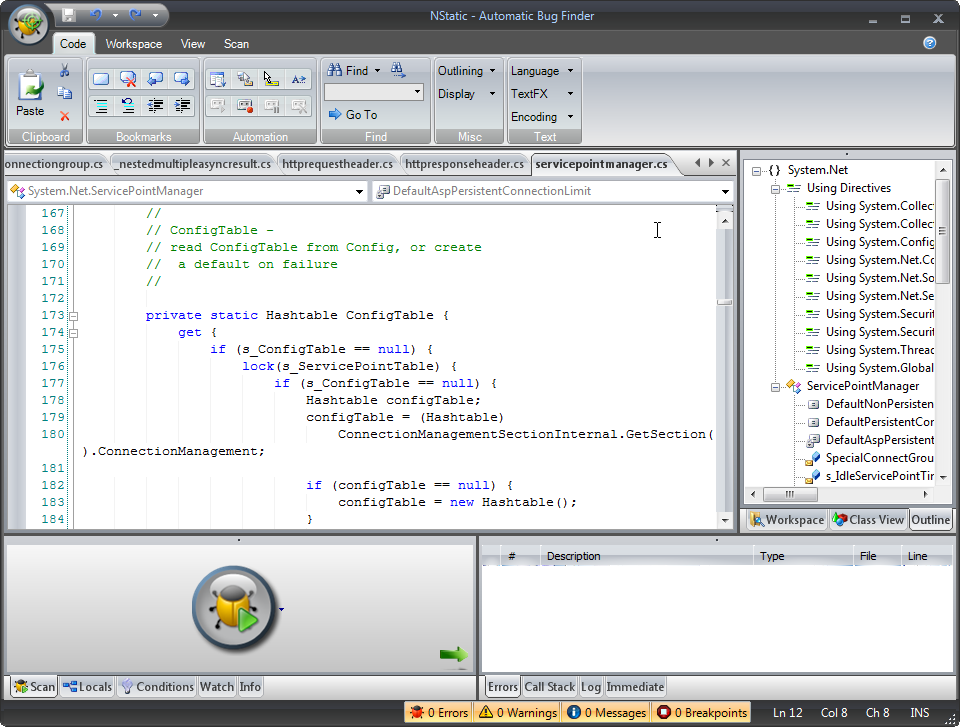
I have got another month of UI tweaking and bug-fixing left on my tool. Probably within that time I will released a non-public build to the few dozen people on my beta list, followed sometime later by a more extensive beta.
I am currently planning on talking about NSTATIC during a NETDA user group meeting on December 4th (not finalized yet) at building 40 in the Microsoft campus.
There’s some additional issues that I am starting to think about — my website, ecommerce, documentation, and localization.
I purchased a number of CSS-based site templates, but I am seriously looking at having a professional build my initial site. My initial site will be simple, focusing on providing information and directing customers to a Digital River page for purchases. I’ll also include a forum powered by InstantForum.NET for community-based support (ala FeedDemon).
I will be writing blog posts about different details of my product to spur myself to write documentation.
For localization, I am looking at using the Microsoft Glossaries in MSDN and the Microsoft Terminology Translations spreadsheet. The languages that I am looking at include German, French, Spanish, Portuguese. These are the most popular Western languages. Japanese is another big one, but there are probably other Far East issues besides text translation. Actually since I am automating the translation, I could probably extend it to other languages. The .NET Framework has a really nice localization story for WinForms.
I might get beta testers via a web-service to contribute translated suggestions. Fortunately, much of the error text I will be displaying will actually be pulled off dynamically directly from the source code or from the Framework DLLs in the current locale.
10/23/2006 11:43:36 PM
One distinctive feature of my static analysis tool, NStatic, is support for fast interprocedural analysis as demonstrated by this snapshot of the callstack window depicting a stack trace, eleven function calls deep. Note that this is a pre-release product, and anything I mention in this post is subject to change.
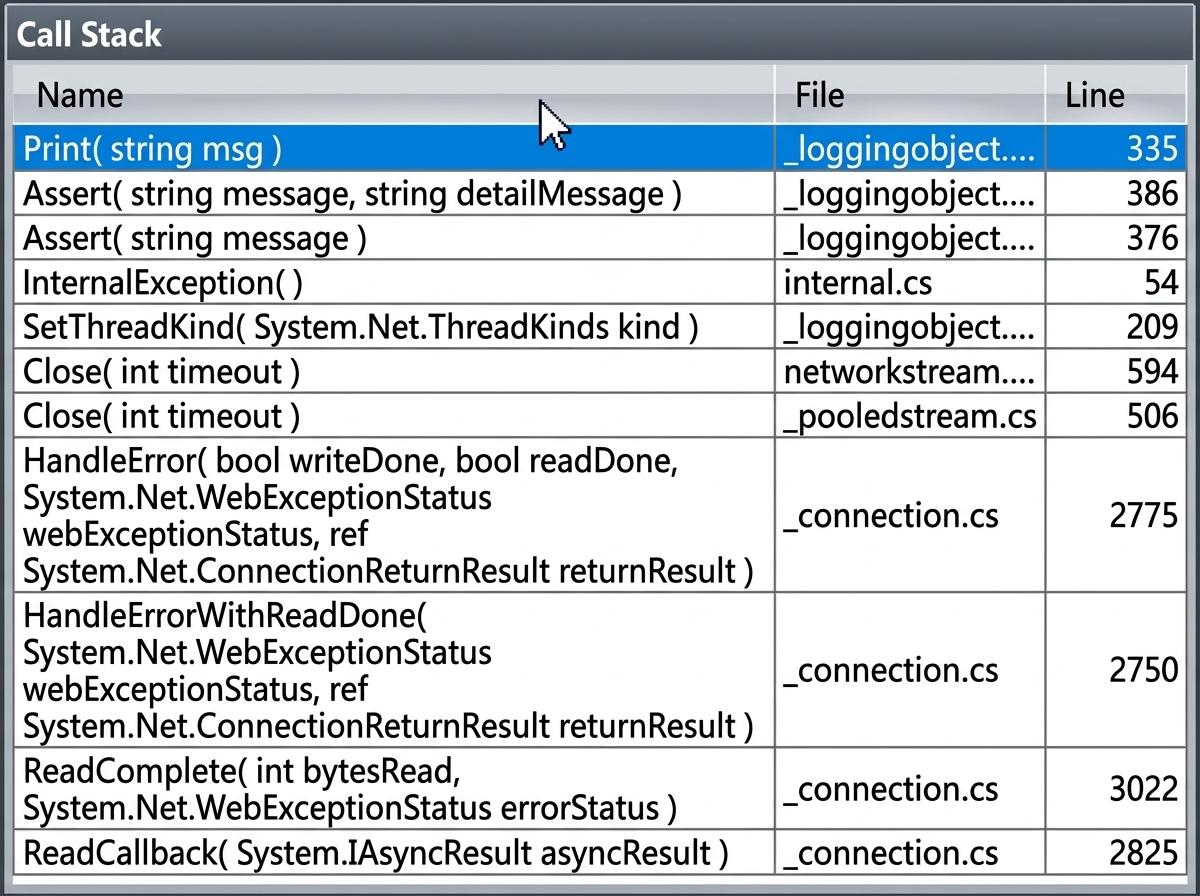
Interprocedural analysis is rare among static analysis tools because it can drastically slow down analysis of code; analysis tools that do this may run for days, making it impractical for frequent use. As a result, some tools like ESC/Java and Spec# perform modular analysis, which only examines a single function at a time.
These shortcomings limit the utility of the aforementioned tools. Therefore, I decided that a good solution requires a good treatment of interprocedural calls and took up the challenge.
I divided functions into two categories—simple and complex. Simple functions consist of expressions (including function calls), assignments, and if statements. Complex functions consists of looping constructs, gotos, and switches. I am considering moving switches to the former category. I didn’t based the functions on factors such as size or cyclomatic complexity, because my original criteria seems to work well in practice.
Simple functions are always traversed up to a large user-settable limit (default = 10). Properties, indexers and constructors typically fall into this category. The amount of time required to execute a simple function is probably similar to the amount of time that would transpired had the function call been bypassed.
Complex functions are traversed up to a small user-settable depth (default = 2). Each increment in the depth of the traversal typically doubles the scanning time. In such cases, it is usually better to simply evaluate the pre- and post-conditions of the function and invalidate any variable that could possibly be changed by the function call. Pre- and post- conditions are automatically deduced (or explicitly entered through asserts/specification) from the body of the function and also propagated through nested function calls. Contrast this with ESC/Java which requires the user to manually propagate annotations to each caller of a function.
Whether a function is traversed or bypassed, a full stack trace into and including the bypassed functions can still be built. Bypassing simply makes less information available for finding errors and causes the tool to proceed more conservatively.
In addition to regular methods, there is special handling for iterators, closures and interface/virtual methods. Virtual/interfaces methods and overrides are conceptually combined into one large function with nested if-else statements containing type-checks (ie, obj is type). Closures carry around frame information, and iterators called within foreach loops undergo a transformation in which the body of the foreach loop is passed as a closure to the iterator just as in Ruby.
To complete the story, static and instance constructors and field initializations are executed early, so that class invariants can be deduced and made available for analysis of normal methods. A topological sort of non-constructor methods also ensures condition and modification information of callee functions are available to caller functions, if any callee needs to be bypassed.
10/24/2006 05:55:52 AM
Omer van Kloeten talks about Spec# in the Real World and points to Mike Barnett’s talk about Spec# in the Lang.NET Symposium. While he likes the technology, he’s worried that most developers will find it too inconvenient to use.
I am planning on adding specifications support including syntax highlighting on a minor update that will quickly follow the initial NStatic product. This is a minor addition, developmentwise, because, even in the initial product, specifications are automatically inferred for each method and class; you just can’t enter them explicitly just yet except through use of asserts and throw clauses.
This points to a major difference in design goals between the Spec# guys and myself. I put a major focus on usability; in order to serve the most users, the product should be as frictionless and enjoyable to use as possible.
The Spec# and ESC/Java guys assume developers are “guilty until proven innocent” and require developers to explicitly make every assumption as Judah mentions. This code is suspicious; you must have committed a crime. This leads to extensive annotations baggage and a lot of work from developer such as this example in the Spec# mailing. Even with the effort required, Spec# misses this glaring hole from Judah’s comment due to its modular design and lack of interprocedural analysis:
object foo = new object(); SetFooToNull(foo); foo.Bar();
NStatic basically assumes that you are “innocent until proven guilty.” Aha! I found the smoking gun; you did do it. The example above is trivially caught; the product also finds a class of redundancy errors that are missed by Spec#. All you need to do and open your project file and click the big “Scan” button.
The application proceeds quickly through the codebase, reporting errors as they are found, allowing the user to interactively correct errors as the scan is proceeding.
Background scanning and instant interactivity create a modal-free experience and eliminate the customary wait typical of most scanning and compilation tools. Even more, NStatic supports scanning of individual code files for more speed, even if the rest of the project doesn’t compile.
New asserts, throw clauses and specifications can be added incrementally to a codebase over time.
Note: This is a prerelease product, so statement above is subject to change.
11/01/2006 01:01:24 AM
This is a followup to my original post on creating an effortless user interface for the user.
In some of my earlier posts, “NStatic Status and Direct UI”, I mentioned the use of arrows and other markup to depict the flow of execution up to the current error or breakpoint. Right now, I am currently tweaking the highlighting and would appreciate any opinions.
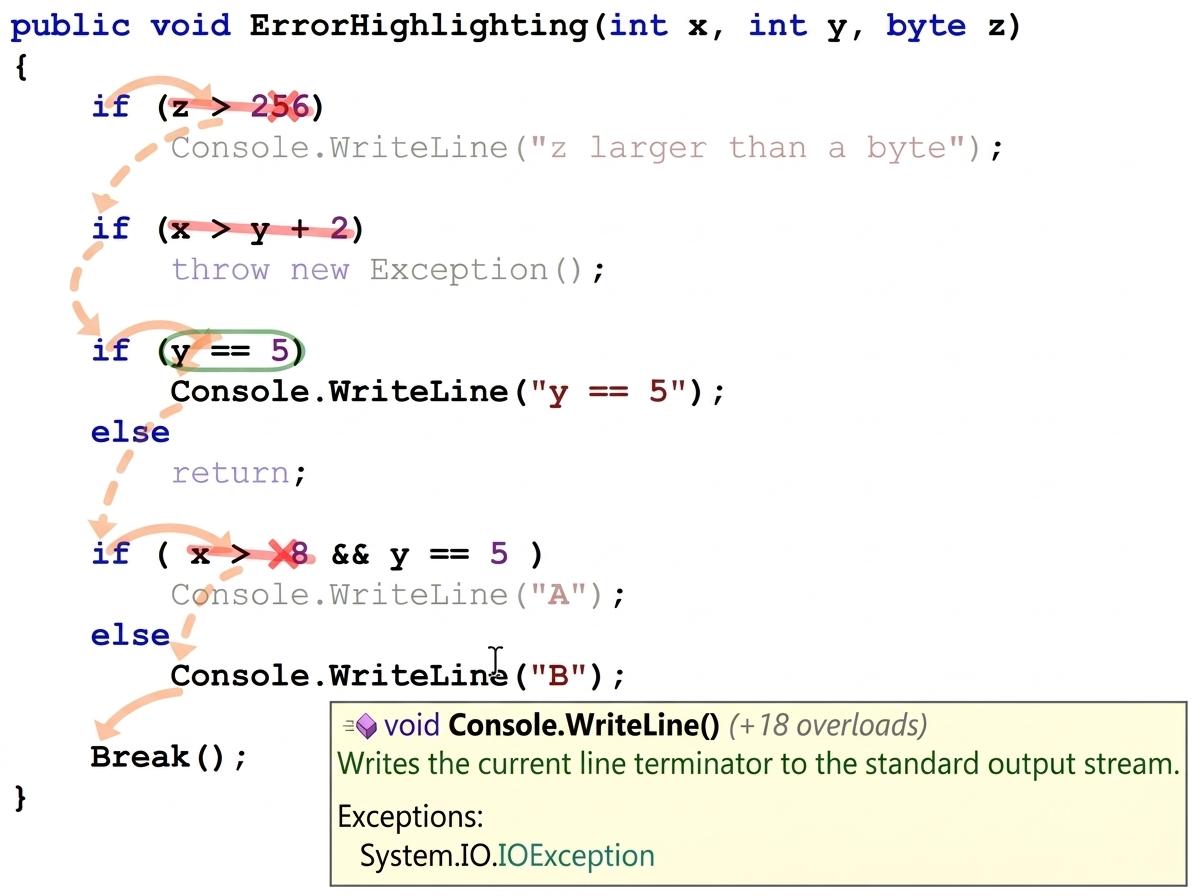
Arrows are drawn from each statement or condition to the next statement or condition. A solid arrow indicates that code underneath the solid arrow may be executed. The words “may be” is key as we may have an *if *or other statement whose condition may be either true or false but which does not provide any relevant information for understanding an error. In this case, a solid arrow just skips over the body of the if statement to the next statement in the enclosing block (as depicted below), indicating that some code in that if statement is executed.
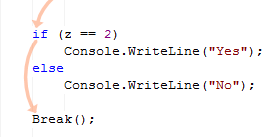
A dashed arrow indicates that code between the start point and the end point of the arrow is ignored. (I’ll probably choose a lighter color for the dashed arrows; my original choice, alpha-blended yellow, was not a good one.) Normally, the ignored code sequence will also be dimmed, allowing the user to focus on the more important statements in the function. The examples above illustrate dimming inside conditional statements and expressions, but switch statements and other control statements (break, continue, return, throw, goto) can also introduce dimming.
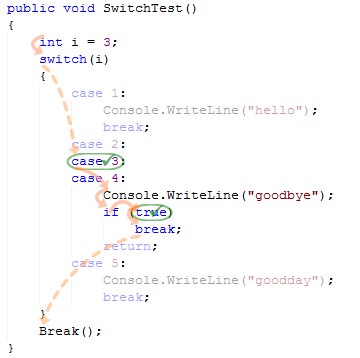
Besides arrows, conditional expressions may also have additional highlighting indicating its truth value, but there is a small complication. A conditional expression may be always true/false, or it may have an assumed value, which is necessary to trigger the current error or breakpoint. Both types are shown in the first image above. “Always” values contained an additional checkmark or cross to indicate truth or falsity.
I am not satisfied with the current visuals and will probably use underlines to distinguish one of the types from the other.
11/16/2006 02:24:16 AM
There aren’t many times where I can compare bits and pieces of code that I have written to those of other experts. One such time involves active loops (aka, parallel apply).
Shortly after posting on Concurrency last December, I began implementing my own version of active loops mentioned in the posts. A newly proposed extension for a future version of Visual C++, an active loop is a loop in which some iterations may run in parallel, typically over a collection. Visual C++ already has a limited support in the form of OpenMP.
Since that post, I noticed many entries posted on blogs and articles:
I recall Jeffrey Richter producing an implementation in one of his MSDN articles or in his PowerThreading library, but I cannot seem to locate the code snippet.
My own code is similar to Larry’s except that I used BeginInvoke instead of DynamicInvoke (reflecting my preference for early binding) and the use of the AutoResetEvent. BeginInvoke requires a call to EndInvoke. I’ll post my code snippet shortly after I sufficiently tested it.
I picked up from Joe Duffy the use of Environment.ProcessorCount to optimize the number of threads to queue from. Since he’s using the thread pool, it may be worthwhile to also look at ThreadPool.GetAvailableThreads().
Although my product is multithreaded, the parallelism is limited. My code analysis run in one thread, while the user interface runs in another. I am planning to introduce additional parallelism into my tool to take advantage of the new multicore systems available today; because I rely heavily on immutable data structures, the transition should be painless. I just purchased a Core 2 Duo E6600 Dell System with 4MB cache to replace my aging Pentium 4 desktop of three years and to experience and test with true parallelism.
My preference for multithreaded programming is to rely on immutable state, actor objects, and message passing. I try to avoid share state and low-level threading constructs; when I can’t, I rely on the CLR basics such as locks, interlocked calls, and don’t try to invent my own.
I have also been looking at BackgroundWorker, trying to uncover any differences between it and Control.Invoke. Unlike the Control.Invoke mechanism of .NET V1.1, the BackgroundWorker class is a new component available outside Windows applications; it uses a new abstraction called a SynchronizationContext. One difference appears to be that a call to ReportProgressChanged in BackgroundWorker usually waits, but not always, until the event finishes before proceed. Profiling of my app indicated a substantial amount of time spent in this call.
A reader wrote me around February mentioning that the MSDN article for BackgroundWorker contained a mistake. The author indicated that the BackgroundWorker will perform certain operations like ProgressChanged and RunWorkerCompleted on original calling thread. That’s probably only true for WinForms apps, which has a message pump, although one message board topic suggests that in some cases RunWorkerCompleted will be invoked in a third thread, if the SynchronizationContext is not properly initialized by WinForms. In console apps with no message pump, injecting a function call into a busy thread would be a bugfest and a security hole, which is why Thread.Suspend and Thread.Resume have been deprecated in Whidbey.
11/25/2006 03:31:56 AM
One of my goals of my static analysis tool, NStatic, is to support parameter validation of API calls. My initial approach was to scan the Rotor (SSCLI) code base to automatically infer requirements on each of the parameters in the Base Class Library of the Framework. I also looked at using Reflector and the FileDisassembler addin to handle closed parts of the Frameworks including the recently released .NET 3.0.
However, I found this approach to be unsatisfactory:
Therefore, I decided to interpret IL directly. This has a number of advantages:
This task has added a few more weeks to my product release, but should be well worth it.
On a related note, I long abandoned another idea of mine. Symbolic processing, which operates at the conceptual level, leaves the door open for optional reflection-based calls of methods of immutable data types, if all the parameters are fully specified. However, this turns out to be complex for many reasons such as nonterminating function calls, presence of side effects, and the inability of reflection-only assemblies to execute code.
12/20/2006 06:29:54 PM
J Strother Moore described program verification in his talk entitled “A Mechanized Program Verifier” at the 2005 Verification Grand Challenge Workshop.
The verification community seeks to build a system that can follow the reasoning of an average human engaged in a creative, computational, problem solving task lasting months or years and spanning an arbitrary set of application domains.
Now step back and reconsider what was just said: we seek to build a system that follows the reasoning of an average human in an arbitrary, creative, computational, problem-solving task.
I liked his quote, because it summarizes well the type of software I am trying to build, among which is a verification tool. I also find this interesting because the name of the conference identifies verification as the Grand Challenge, implying that I am just an inexperienced outsider, without the academic credentials, foolishly attacking an extremely hard, maybe impossible problem, that have already eluded the top minds.
Moore then compares the 40–year old field to a dark continent still to be explored and that we are still explorers in a sparsely inhabited coast.
If the augmentation of the human mind were a dark continent to be explored, then such applications are on the coast.
I say let us explore. I say let us mount an expedition. Let us go deeply into the heart of the continent. We will not map the whole thing – only a narrow path. But let’s get off the coast. Let’s build a track into the interior.
Let’s build a machine that reasons. What do I mean by ``reason’’? I mean to deduce the consequences of more or less arbitrary assumptions.
Here’s my suggestion. Let’s build a system that can follow – effortlessly – the reasoning of a single talented human being engaged in some deep problem solving task. So … the machine must be much more powerful than today’s mechanical expert assistants.
I don’t think this 40–year old field has been really studied. There was a substantial amount of research done in the 1970s. (Many of the typewritten research papers back then strike me as being of higher quality than those of modern times.) While there has been a recent revival in software verification in the past decade, some of the new work has been mostly pragmatic. Between those two times, an entire generation from the 1980s to 1990s of research was lost. The one major paper, I found from the 1980s was a PhD thesis, “Techniques of Program Verification,” written by Greg Nelson. This turns out to be the same guy, 25 years later, working on the Simplify theorem prover, which is being used today as the basis for a number of verification tools including SLAM, Spec#, and ESC/Java. It seems that just a few people are driving the field of software verification forward. (Much of the field seems to have moved onto hardware verification, which may have had a more critical need for the technology.) An Internet search confirmed my suspicions as one Stanford researcher responded in his email to a colleague on “Why has verification died?”:
From the late 1960’s to the early 1980’s software verification was a thriving field: new inference methods were developed, tools (like the Stanford Pascal Verifier) were developed, PhD’s granted, and so forth. Since then it seems that little has happened: verifiers aren’t part of industry’s tool kit, computer science students rarely use verification (and even less often, verifiers), etc. What happened?
OK. I’ll take a wild shot at this. Here’s my extreme position:
Verification is hard. But when there is an adequate incentive tobe sure about correctness, some combination of verification and testing is worthwhile.2.
There were and still are significant language and semantics
issues. The early work was almost all on first-order languages --
Pascal does not allow procedure parameters that have procedure
parameters. When you try to go beyond that, you get into lots of
questions about semantic models. That has taken a long time to
explore.
3.
The lofty goal of complete verification is too ambitious. Set your
sights lower, and you'll have a better chance of success.
(I don’t actually think any of the three points are true, but I’ll address those in a future post. The issue of higher-order functions, in particular, can be handled in a satisfactory way.)
The late 1990s on, according to Infoworld, saw new source code tools and accelerated research, both of which bode well for the future of automated source code analysis. However, the article is somewhat disheartening. Source code analysis is seen as necessarily consuming vast quantities of computing resources, particularly time, and being primarily driven forward by Moore’s law rather than better technology. “With too much precision, an analysis can take years,” the article writes. Consequently, commercial vendors have given up and shifted focus towards issues like usability.
… there has been a fundamental philosophical shift in how we approach the issue of source code analysis. Early researchers were interested in program correctness, he says. The goal was to prove that “my program will, under all circumstances, compute what I intend it to compute.” Now, he says, the emphasis has switched to a more tractable form of proof: that “there are specific properties my program does not have.” Buffer overflows and deadlocks are examples of such properties.
The problem lies in the naive use of the traditional theorem prover, which, through elementary steps of deduction, leads to exponential analysis times. Many researchers have resigned themselves to notion that analysis must be intractable, because of a theoretical result that states that first-order predicate logic and many other logical theories are not decidable. However, the same theoretical results necessarily apply to human beings, slogging through proofs with pen and paper, yet mathematicians, for some reason, are far more effective.
The analogous approach of the brute-force theorem prover in the human forum is work of formalists, Betrand Russell and David Hilbert, in the early 1900s. As De Millo writes in “Social Processes of Theorems and Programs,”
They saw mathematics as proceeding in principle from axioms or hypotheses to theorems by steps, each step easily justifiable from its predecessors by a strict rule of transformation, the rules of transformation being few and fixed. The Principia Mathematica was the crowning achievement of the formalists. It was also the deathblow for the formalist view. There is no contradiction here: Russell did succeed in showing that ordinary working proofs can be reduced to formal, symbolic deductions. But he failed, in three enormous, taxing volumes, to get beyond the elementary facts of arithmetic. He showed what can be done in principle and what cannot be done in practice. If the mathematical process were really one of strict, logical progression, we would still be counting on our fingers.
…or more succinctly, with a quote from Henri Poincare, “if it requires twenty-seven equations to establish that 1 is a number, how many will it require to demonstrate a real theorem.”
It should be possible for the computer to analyze programs in a more human-like manner; however much overhead we incur in maintaining fidelity to how the human mind works, it can’t be as bad as existing exponential approaches, which are leading researchers to spend considerable time devising a multitude of exotic duct-tape solutions on top of bad infrastructure.
In my talk on February 5th, I’ll describe a novel, simple and stunningly elegant approach, which is partially realized in my NStatic product and could be a better solution to the verification problem.
12/25/2006 07:38:26 AM
Source code analysis is not really the focus of my software company. I am just trying to build a fast and intelligent reasoning system to support the development of my other applications. I decided to develop NStatic as a testbed for my core AI technology. It was actually supposed to be a short-term diversion, but I sensed substantial interest for this tool, the problem itself was intriguing, and my AI was improving substantially.
Verification is a strong word. I am trying to introduced a source code analysis tool, which is an alternative to unit-testing. Verification as used by Floyd, Hoare, Djisktra, etc imply total correctness—ie, the software terminates and is consistent with its annotated specifications, a form of double-accounting in which the same program is essentially written twice in a different declarative language (typically, FOPL). Some industries with heavy reliability needs require such verification, so much so that even the verifier program needs to be verified.
I am still learning quite a bit about this field. A few days ago, I learned about model-checking, a fascinating approach where one can statically track execution of programs over time and, using temporal logic, find errors like “after the dialog comes up, the user cannot not hit the button three times.” Not having any background in this area, I also rediscovered a number of techniques. For example, in translating imperative code into its functional representation, I reinvented denotational semantics. I uncovered a free online book from the 1980s that save me the trouble of uncovering the remaining loose ends. Canonicalized if-expressions and binary decision diagrams, another of my re-inventions, were also in used by the ACL2 and possibly other theorem provers for over a decade.
My limited knowledge in this area, until recently, was a purposeful attempt to come up with original algorithms and avoid being influenced by other software technology. This has paid off well as I recently searched issued patents the past week and only made minor modifications to my software.
I previously made the erroneous assumption that the popular commercial software packages currently out in the market represented the state-of-the-art. I was a bit surprised at the lack of advancement in the technology. I saw a pyramid, which fell into the several categories. In the bottom rung were a large number of style checkers and syntax-based tools, which didn’t seem to find substantial errors. The next few rungs in order of increasing sophistication are the data flow analysis tools, simulators, and limited theorem-provers. The more sophisticated tools find serious bugs, but still had a sizable false-positive rate, a modest find rate, and/or non-interactive analysis times. The class of errors found also seemed restricted to a limited class of errors such as pointer errors and bound checking. Specification tools like ESC/Java and Spec# are new and interesting; however, they only perform modular analysis—a weak form of interprocedural analysis. I wondered if all of these issues be simultaneously addressed?
The state of the art is actually far more advanced. There apparently are substantial proprietary efforts in various industries (military, hardware, medical, etc) for guaranteeing ultra-reliable software built on top of free industrial-strength theorem provers like HOL, reFLect, and ACL2. In fact, there is a field called formal methods, which includes writing specifications to establish the correctness of programs in conjunction with said theorem provers. Verification might actually be a reality for those companies who absolutely must have reliability and are able to afford it. (By the way, these provers are quite similar to my own AI system in their heavy use of computer algebra and other functional techniques. My previous critique was leveled on traditional provers that were primarily based on predicate logic.)
My software can’t make guarantees of correctness. Its underlying use of computer algebra may even be unsound. However, my software genuinely attempts to understand the source code and to detect a wider class of errors using a fresh, more symbolic approach.
02/06/2007 11:07:11 PM
I gave a presentation and demo of NStatic to the .NET Developer Associations user group yesterday. There were at least two readers of my blog that showed up including Serge Baranovsky of VBCity. Serge actually sells a static analysis tool, so I was demonstrating to the competition. I received a good response and obtained much interesting feedback. People from the audience called it “intriguing.”
I introduced myself as a former developer of a big software company, who set out on his own to develop his own AI software company, and that this was my first public demonstration of my software product.
I went through existing tools in the C++, Java, and .NET space. There are few tools available in the .NET space. Microsoft Team Suite has an enhanced version of FXCop (probably just called Code Analysis).
There are some tools (mostly for C++) listed in these links.
http://www.testingfaqs.org/t-static.html
One site had a price list revealing that the advanced commercial static analysis tools had a per user cost of >10K. The prices have since disappeared the web page.
The Java.NET has some benchmark comparisons on two of the leading static analyzers both for C++.
http://weblogs.java.net/blog/cos/archive/2006/10/static_analizer_1.html
I have been looking at some of these sites to get a feel for the typical find rates, false positive rates and analysis times. My goal is to beat them all.

This was an entire slide in which I included some bullet points in the blank document area.
NStatic: Original new approach
I included a disclaimer that this is a work in progress, and I don’t know if any of these assertions are really true, since my product isn’t out yet and I have not actually use most of the tools out in the marketplace.
I mentioned that there were two major changes that I made last November and December. One was IL Interpretation and the other was a change to my interprocedural analysis due to an Microsoft/Intrinsa patent on interprocedural analysis. The Microsoft patents show how one could avoid doing a full interprocedural analysis by storing function summaries in order to make analysis proceed quickly. I heard that Prefix can still take a day to run on large codebases; that’s why they built a scaled down intraprocedural version called Prefast. Instead of taking shortcuts by summarizing each method, I just tried to figure out how to do full interprocedural analysis quickly; my new approach might even be faster than the earlier one.
I proceeded to go through different parts of the UI with examples.

I remarked about the similarity to Visual Studio with the various panes– Solution Explorer, Error List, Call Stack, Locals window.
A few panes are missing in the first release, the Watch window and the Immediate window, which would allow the user to observe arbitrary values and execute arbitrary code symbolically. The Immediate Window, in particular, would be similar to the input prompt in Prolog that would take any query and provide an answer. The source code would in essence be a knowledgebase of facts, and you could ask arbitrary questions.
I have breakpoints, but don’t currently allow stepping. The breakpoints are not integrated into the UI right now, but instead require a call to any Break method.


I mentioned that the previous screenshot was actually a scan across the Rotor codebase, but I was using a short timeout in which about 997 of 37K methods timed out. Some other options as well as IL Interpretation was also turned off, which is why the analysis time was just over 2 minutes.

I used the same images as in my Effortless UI, II post, but I did include a couple of others.


There are still glitches in my highlighting. I haven’t really spent much time thinking about this.
I didn’t make it clear to the audience apparently that the arrows were produced by my software. It was until several slides later that an audience member asked, “Are those arrows produced by the software, since they look like drawings?” I said, “Yes! That’s the point.”
Another audience member noted that I could actually warn against the parameter, n, not being used in the TryCatch function. I told him that I do in fact check for unnecessary parameters. In fact, I check for a more general case, which is whether any parameter is unnecessary–ie, if its value must be a function of any of the other parameters or global state. This is an example of using general principles over specific rules. I talked about this later in my presentation, but here is an example.
I pulled out NStatic and showed two simple functions to make my point clear.

In the three parameter function above, the parameter c is unnecessary, since it is function of the other parameters. In other words, c is expressible in terms of a and b, as shown in the locals window. Similarly, in the first function, x is redundant, because it can only be the value 3.

This was another screenshot in which I referred to a bug in the codebase. This also shows off other views in the product including the ClassView.
In the second half of the slides, I went more into the technical description of how my product works.
02/07/2007 05:27:25 PM
This is a continuation of my previous post NStatic Presentation.
This half of the presentation was more about technical details. Many in the audience didn’t really seem to understand what I was trying to say.

I stated in my presentation that my goal in this product is the illusion of true understanding. What do I mean by true understanding? Well, I think it’s somewhat like the Turing test, which claims that a machine could be said to think, if it is indistinguishable in behavior from a human being.
Can I achieve some semblance of a human-like intelligence in my tool, with performance that is indistinguishable from a code reviewer with no prior experience with the code base? I am still far away from that point by my reckoning, but there are three important ingredients that get me closer to the dream: Symbolic manipulation, interprocedural analysis, and the application of general abstract principles rather than specific rules.
The data structure that I used store and represent values is an expression in a symbol functional language, based on lambda calculus. Since the language is Turing-equivalent, we can represent and evaluate the value of any variable in the program. What’s important is that operations in this language can work directly with symbols rather than numbers. (Numbers by the way are just accidents. While numbers in C-based language seems to be omnipresent, programs are regularly written in sizable functional languages like Lisp and Haskell without any use of numbers.)
Through the magic of functional pattern matching, we evaluate expressions by replacing patterns with the expression with simpler forms that known to be equivalent. When we evaluate expressions in this way, the result is often a simplified version in a canonical normal form. The benefit of reducing expressions to normal forms is that we can quickly compare them two expressions for equality.
The examples below illustrate some basic simplifications of arithmetic and comparison operations.


Our symbolic manipulation also extends to conditionals as depicted in the following example.


Traditionally, instead of constructing a functional if expression, a static analyzer might either use ternary values (true, false, don’t-know), in which case data would be marked with “don’t-know,” or the analyzer might insert into a knowledge base a disjunctive clause such as p < 1 && data == “hello” || p >= 1 && data == null.


Here we see the value of data in an extended version of the previous code. Because we know the value of p, we actually can simplify the value of data to “hi.”

The conditional operator arises naturally in other contexts such as when a field accessor is being modified.
Each procedure is converted to side-effect- free functions
We use denotational semantics to represent our code. A functional representation can be analyzed and simplified much more easily.
Changed loop variables are assigned the result of an applied recursive lambda expression or a closed form thereof.

This gives us the ability to relate the results of loops with each other and with other functions. In this example, if fact is a recursive method that computes the factorial function, then f==fact(n) would be true, since they have the same canonical form.
I spoke about General Principles versus Specific Rules in a prior blog post on “Intelligence versus Intellisense.” I wrote of a basic philosophical goal of mine, which is to replicate the actual human reasoning process as faithfully as possible, often choosing less efficient methods for better fidelity.

One of the first types of analysis is Exception Analysis:
The tricky part is determining whether an exception is fired.
Another type of analysis relies on notions of redundancy and effectiveness.
Again the difference here from other products is how I actually compare expressions and the state of the world before and after evaluation. Nothing is based on low-level analysis of syntax but rather a higher-level semantic analysis.
An important part of understanding code is knowing the relationships between each of the methods. Analyzing each method in isolation doesn’t lead to intelligent analysis, if all the callee functions are not examined.
Below is a call stack window showing a stack trace in Rotor, depicted an interprocedural call.

I also brought up the point of the “Ghetto,” which is how existing tools focus only on primitive types and low-level system exceptions like null references.
I do want to move beyond that point and get out of the ghetto, finding errors on complex, user-defined types and functions, not just primitive types. I also want to effect manipulate higher-order functions.
Closely connected with interprocedural analysis is IL interpretation. We could analyze our codebase, but still miss a big part of code that is executed. The framework and third-party libraries are just as important for intelligent static analysis.
Since I discovered a way to perform interprocedural analysis very quickly, it made sense for me to pursue IL interpretation of system frameworks, rather than hardcode parameter validation.


In the examples above, I show how IL interpretation can occur symbolically with the results from Math.Max(a,b) in mscorlib.dll.
As I mentioned earlier, I used a functional approach, that corresponds to directed higher-order equational logic (aka universal algebra). This functional approach is a quite different from the logical approach used by existing advanced static analyzers. The functional approach is faster, because it has the efficiency and determinism of program execution and not the wastefulness of nondeterministic search. The logical approach is not just slower, but also more limited being a decision procedure, which can only answer yes/no questions.
I listed a set of possible future features.
Half of these related to integrating with a process–command-line execution, custom rules and transformations, XML export. The other items include specifications and enhanced debugging capabilities like immediate window and friendlier breakpoints. I am also contemplating VB.NET support and IL-level analysis for other unsupported .NET languages.
03/07/2007 12:58:38 PM
I thought that I would briefly explain the concept of continuation-passing style from my previous post. CPS is a way of simulating continuations in a language that doesn’t support the feature. Basically, we making a function call, one passes to the call an additional argument, which is another function that represents the continuation of the calling function.
Anonymous methods (closures) in C# 2.0 enables CPS with a very convenient syntax. Closures are frames constructed on the heap—allowing us to bypass limitations on function calls imposed by the CLR stack-based implementation.
public void Method()
{
     // Code before call
     T result = Call(a, b, c)
     // Code after call
}
becomes
public void Method()
{
     // Code before call
     Call(a, b, c,
     delegate(T result)
     {
           // Code after call
     });
}
The callee function returns a value by calling the continuation function passed in with the return value.
public void Call(int a, int b, int c, Action<T> func)
{
      // ...
      if (...)
      {
          func(result);
          return;
      }
      // ...
}
If a method itself returns a result, then we might return the result of the call like so among many possible ways.
public T Method()
{
     // Code before call
     return Call(a, b, c,
     delegate(T result)
     {
           T result2;
           // Code after call
           return result2;
     });
}
Unlike a stack-based implementation, the continuation can be called multiple times with different return values or not at all. This technique can be used for backtracking, multithreading, and many other uses. Richter previously used this for a Fire-and-Forget approach to locking. I found this technique useful with dialog boxes to eliminate modality.
03/07/2007 02:11:27 PM
I was planning on writing about anonymous recursion relating to work in NStatic, but Wes Dyer beat me to the punch with his post Anonymous Recursion in C#. In addition to my name, Wes Dyer shares my desire to push a more functional style of programming in C# (and he’s also a member of the C# team, so we may win).


Loops and recursive functions in NStatic are converted to recursive lambda expressions, and then through various techniques like unrolling, recurrence solving, inductive proofs, are simplified to a closed form. The expressions above are intentionally unsimplified for illustrative purposes.
Each of the lambda expressions displayed above are recursive. Nonrecursive lambda expressions are applied over their arguments, so they aren’t normally seen unless standalone without any arguments.
I am not currently sure how I will eventually display lambda expressions in C#; the current display is attractive to my eyes, personally, but may turn off users unfamiliar with lambda calculus. I probably will ultimately go with a more C#-like syntax. My previous attempt was quite unreadable or quite verbose because the lambda operator => looks like the inequality operator and the use of parenthesis was quite excessive. Another possibility is to use C# 2.0 syntax with delegate and return keywords.
For those with sharp eyes, I introduced a fix operator to concisely display recursive lambda expressions. The fix function takes as its argument any lambda expression that includes a first parameter, representing the name of the function itself. That parameter can be used inside the lambda expression to recursively call itself.
In a language that does not explicitly have recursion operators, lambda expressions can be used to introduce recursion. It’s not very pretty, but one such operator to do this is called the Y fixed-point combinator.
    public delegate Func<X,T> YFunc<X,T>(YFunc<X,T> f);
    public static Func<X, T> YCombinator<X, T>(Func<Func<X,T>, Func<X,T>> f)
    {
        YFunc<X,T> lambda = delegate(YFunc<X,T> y)
        {
            // return f(y(y)); -- only works with call by name
            return f(delegate(X x) { return y(y)(x); });
        };
        return lambda(lambda);
    }
The combinator does not allowed to use recursion, only function application, in its definition, since it’s purpose is to introduce a form of recursion in the first place.
The Y combinator is possible in a typed language like C# because C# allows us to recursively define types–that is, YFunc was defined in terms of itself. A slight modification, an additional lambda expression, was also needed to allow f(y(y)) to be called by name.
A more efficient function for anonymous recursion takes advantage of assignment in the C# to avoid the creation of more than one closure is the following function.
    public static Func<X, T> Fix<X, T>(Func<Func<X,T>, Func<X,T>> func)
    {
        Func<X,T> fixfunc = null;
        fixfunc = func(delegate(X x) { return fixfunc(x); });
        return fixfunc;
    }
An example of its use in C# is the following:
    Func<int,int> func = Fix<int,int>(
        delegate(Func<int,int> f)
        {
            return delegate(int n)
            {
                return n<=1 ? 1 : n + f(n-1);
            };
        });

Console.WriteLine(func(6));03/17/2007 09:53:00 PM
Andrew Stopford wrote about a Microsoft Research technology called parameterized testing being developed on a project called Pex (Program EXploration). Pex is described as an…
…intelligent assistant to the programmer. By automatically generating unit tests, it allows [one] to find bug early. In addition, it suggests to the programmer hot to fix the bugs.
In addition to specifications, I have been thinking since last spring about how I could better integrate my software with unit-testing. While I am not planning on building a dedicated system like Pex, one common trait that my system may have with Pex is the ability to symbolically analyze a function with unspecified parameters.
Some of the changes that I had been considering included:
In addition, NStatic would not actually cause any external side-effects to the environment, which may or may not be a benefit. Also, there may also be some cross-pollenation and integration with the specifications work post-V1.
It’s not entirely clear to me at the moment what additional value the last two bullet points have over just performing a regular scan over the codebase (and/or using specifications): Automatic calls to Setup and Teardown? More structured tests? Exploring specific scenarios?
These are just some of my thoughts for the long-term future of my product. None of these features are coming out in the first version.
03/18/2007 03:44:06 AM
The MVP Summit saw three different demos of various static analysis tools demoed to MVPs. I know all of the developers of the tools and even hinted at times at whether we should provide some links or integration, since our tools have somewhat mutually exclusive functionality.
Serge Baranovsky demonstrated his beta analysis tool, CodeIt.Right, which is similar to FXCop, but offers refactoring capabilities. Serge actually lives close to me and attend my NStatic presentation in February.
Patrick Smacchia demonstrated NDepends 2.0. Raymond Lewallen [MVP] reported that NDepend made a huge splash in Redmond.
I couldn’t be happier for my friend Patrick Smacchia - the creator of NDepend. Anybody who knows me knows that I am NDepend’s biggest fan, other than Patrick himself, and really, really want to see the product hit mainstream use and make Patrick rich beyond his wildest dreams!
There wasn’t a day that went by that I wasn’t able to talk to Patrick, but that was quite difficult. You see, everytime I ran into Patrick, he was being mobbed by groups of developers that were amazed at what NDepend is able to do, and what you are able to do with it. There is no telling how many times he demo’d his product (he even had the opportunity to demo his product to a Microsoft developer group in private), but his enthusiam for the product is matched by nobody, and its great to see how his excitement during demos is passed into those around him, getting them just as excited about the product.
Its amazing to see how many people still do not understand code metrics and how easily available the information is. And then to add on a query language - that just blows people’s minds.
This follows from Raymond’s post last month comparing NDepend with new code metrics in Orcas March CTP.
… However, VS code metrics have a long, long ways to go before its going to be something that I use for serious analysis. That’s where NDepend comes in. NDepend supplies over 60 quality and useful code metrics, and also has its own query language that Patrick calls CQL. Its easy to use and is part of my formal build process. Its going to be very hard for anything to dethrone NDepend as the king of code metrics.
I demonstrated NStatic to about a dozen people including Patrick Smacchia, Raymond Lewallen, Scott Hanselman. One idea mentioned to me separately by both Patrick and Scott was the incorporation of code metrics given the amount of semantic knowledge I extract. I could even invent my own metrics. [UPDATE: Raymond also mentioned my product in a post “Another big splash in Redmond – NStatic.”]
04/19/2007 12:00:25 PM
SecretGeek recently has two articles on software estimation:
I didn’t make my April 15th, but I think I am close to a beta release. I went through the first week sick, possibly through chemical poisoning while cleaning, and just lost my flow.
I don’t think that are any real hard issues left. In the past couple months, I made some major changes to remove performance bottlenecks and eliminate limitations. I refactored my core analysis routines to enable unlimited function call depth and to better support symbolic IL interpretation. Every data structure had to support recursion. I also rewrote my theorem prover for logical expressions. It’s completely deterministic now and dramatically faster. I basically discovered an breathingly new algorithm, that is purely functional and fits in just over 1000 lines of code.
For over a year, each month that I have been developing this software product, the performance has improved tenfold, which isn’t hard in a category of software where exponential running times are common place. The performance improvements manifested itself in shorter scanning times and fuller, deeper analyses. This includes going from limited function call depth to almost no restrictions, from hours long analysis to times approaching compilation. I also went from a several dialog options for tuning analysis to none, because the software simply became smart enough that the options were no longer needed.
I still have a number of surprises in store that I haven’t shown yet. There’s still some aesthetics and UI issues to work out during the beta. I plan on getting my some local testers playing with the tool late next week and sending bug reports via Fogbugz, after which I hope to be sending a future weekly builds out to an expanding pool of testers.
06/16/2007 05:46:08 PM
Scott Hanselman recently wrote about teaching children and kids to program the old school way by using the Commodore 64 emulator. It seems just recently that Zenzo, his 18–month old child, jumped off the cradle.
I wonder if old-school programming with direct access to the computer and the operating system is preferable to learning with scripting languages of today. What follows is my case for old-school programming, but scripting languages do provide a much better, functional programming language to learn from..
I first got into programming with the Commodore PET, followed by the Commodore 64. Like Scott, I would spend hours typing up long BASIC and machine language programs (written in hex) from various computer magazines such as Compute! and Run. It was then that I began programming full-time. I still remember 53280/1 as the addresses for changing the screen colors, SYS 64738 for rebooting the operating system. I still have most of the 6510 codes burned in my head. LDA was A9 (169), LDX A2 (162), JSR 20 (32), RTS 60 (96), and of course BRK was zero.
I wrote my own assembler and disassembler and used both to write primarily in assembly language for the next few years (near address location 40960 which was an unused section of memory), which was all before high school. I used my disassembler to decode and rewrite the entire 8K of BASIC ROM and parts of the 8K kernel back to source with meaningful symbols. I remember becoming mesmerized with how the 256 byte stack was used for parsing expressions. Even though processors were slow, linear search was used everywhere even during frequent operations such as changes in control flow and variable access. I eventually added my own extensions to the BASIC language to support structured programming and better graphics.
I also played around as if I was the operating system, disabling interrupts to create my own interrupt routines, which I used to implement a partial multitasker, an animation engine, as well as a rasterizer that bypassed hardware limits for 8 sprites. In the default screen mode, every character occupied one byte of memory for a total of 1000 characters in a 25x40 grid; the number of characters were limited to 255. I also replaced the default mode to bitmapped mode, which consume eight times as many bytes: This enabled me to support character styles (bold, italics and underline), independent background/foreground colors for each character, larger character sets, and integrated graphics. I also experimented with proportional fonts (based on automatic detection of character boundaries and bit shifting) and screen widths larger than 40 characters.
I wrote rather than purchased my own software, as, being a child, I had no money. I built a range of programs including a wordprocessor to figure out how things works; some of these programs were better than commercial versions, but I just did not know how to sell them. I did seriously think about whether I could one day develop and sell my own software independently. In college, I purchased a couple books on developing and marketing shareware.
Programming at an early age helped with my education. I often found myself exposed to college material as a result of my activities. At a self-pace program in my elementary school, I began taking some high school courses while in sixth grade. Because I was already comfortable with memory addresses and stack, I never had the slightest difficulty with pointers and recursion, when I encountered them in C and Pascal; they both seemed natural to me. (Back eight years earlier, when I encountered PEEKs and POKEs, streams of hexadecimals numbers inside DATA statements, and mysterious SYS statements in computer magazines, I did find myself confused.)
06/17/2007 06:19:01 AM
There were a few items that I didn’t show in previous posts on my attempts at visually illustrating execution traces leading to an error or breakpoint.
One is the superimposing of arrows of all possible paths together. For all errors or breakpoints of the same type in the same location with the same call stack, all possible paths leading to the error are shown simultaneously. This has interesting consequences inside various control structures such as finally clauses, loops.

For one thing, this does means NStatic’s reported error count will actually be an underestimate of the number of errors it found, as each reported error count represents multiple bugs. On the other hand, it cuts down on false positive rates in which not every possible path will likely be explored in actual use.
There are some reasons for this. For example, there may be an exponential number of paths leading to the error, so it would not be possible for me enumerate all of them. I do plan on providing a later option in a minor update where additional assumptions may applied after the fact to selectively choose which arrows are most important.

In the bug above, there is a warning given for the cases where we may encounter an error. Inactive code in the function is blanked out.
The execution path is general. From within a function, all types of control structures are supported and accurately depicted from arbitrary gotos, throws, loops, finally clauses. Probably, the main limitations are due to asynchronous exception handling (thread aborts, stack overflows, out of memory), which I am still thinking about. The execution path is shown for all functions in the current call stack, but it would not be difficult in the future to add support for examining the traces of previously completed functions that have vanished from the call chain.
The implementation is simple but completely general–a real functional pearl. The execution path is internally represented as an expression with a sequence operator, which is only simplified with current set of assumptions at the time the user views the error. The expression becomes arbitrarily complex with lambda functions and conditionals.
06/18/2007 07:46:50 AM
One of the side benefits of the NStatic Tool is the ability to solve various types of equations or systems of equations. One set of problems is the solving of systems of equations in linear algebra.

In the example above, we have three equations with three unknowns. Since all three equations are linearly independent, we are guaranteed a single solution as revealed below by NStatic.

I kept the parameter types as doubles, since even though all the coefficients are integers, we could easily get a solution set that incorporates numbers from the rational domain.

Just by changing the integer constant in the right hand side of the last equation from 10 to 11, all of the values would have to be rationals, and last assert would no longer be satisfiable if any of the parameter variables were declared an int.

The value column depicts all of the solutions values in rational form (with a numerator and denominator), even though they were declared as doubles. The use of rational numbers ensures against rounding errors, which could easily introduce hard-to-find bugs into the system.
Another set of problems are polynomial equations. NStatic has the ability to solve polynomial equalities and inequalities. Nonlinear equations arise quite commonly with recursion and looping control structures.

Here I have a loop that computes the sum of an arithmetic sequence and then performs a test on the sum.

In this case, we are able to place a bound on the value of n to ensure that the sum is over 20. The variable sum is a quadratic polynomial of a complex term, so we can find the roots of the equation to come out with a disjunction of all the possible ranges of n.
06/18/2007 09:19:13 AM
WinHEC 2007, Microsoft’s annual event for hardware manufacturers, was held last month. It’s these event that Microsoft overcomes it’s paranoia, and discloses some of its IP in exchange for third-party support and integration.
Each year, I scrounge the Microsoft website for new information released in the event and this year I focused on the static analysis related content, which Microsoft conveniently compiled into a section of their website, Static Driver Verifier – Finding Bugs at Compile Time. This site focuses on static analysis of drivers using the Static Driver Verifier and Prefast. There are some presentations on each of these tools in the following slides.
Static Analysis and Verification of Drivers [WinHEC 2007; 13.4 MB]
Static Analysis Tools: PREfast for Drivers [WinHEC 2007; 1.2 MB]
Prefast is actually integrated into the Team Suite edition of Visual Studio. The other separate tool, the Static Driver Verifier, includes a graphical user interface shown below, that only a mother could love. I am still trying to figure out what is going on in the trace tree pane.

The truth is: It’s not the looks that matter, but the brains. So, I continued checking out the site for evidence of intelligence.
The site contains copious links on the history and progress of static analysis technology within Microsoft. Most of the history is detailed in one document describing the technology transfer of formal methods inside Microsoft (with SLAM and Static Driver Verifiers). SLAM project originated in Microsoft Research in 2000. Microsoft also created the Programmer Productivity Research Center in 1999 with the acquisition of Intrinsa and its PREfix defect detection tool. The paper notes that twelve percent of the bugs fixed before Windows 2003 Server were found with PREfix technology, so it does seem effective.
According to Bill Gates in his OOPSLA 2002 speech, Intrinsa was purchased for 60 million](http://www.theregister.co.uk/2005/06/29/coverity_analyses_freebsd_for_flaws/).
We’ve created a number of things to do rich static analysis. We actually went out and bought for a little over $30 million a company that was in the business of building those kinds of tools, and we said now we want you to focus on applying these tools to large-scale software systems, the kind of system we have in the source code of Windows or Office, and see how far we can get on this.
What’s the likelihood that I will see that kind of money for better technology? Maybe, the price was also for the staffing of the newly built research centers.
Gates continues his speech, going on about the intractability of static analysis and how so many decades have gone by since he dropped out of school without the problem being solved. He exhibits the typical blind spot in the field–or perhaps is just parroting the words of his researchers, ignoring that the theoretical limits of software are only those limits of humans as well. 640K anyone?
We also went back and say, OK, what is the state-of-the-art in terms of being able to prove programs, prove that a program behaves in a certain way? This is the kind of problem that has been out there for many decades. When I dropped out of Harvard, this was an interesting problem that was being worked on, and actually at the time I thought, well, if I go and start a company it will be too bad, I’ll miss some of the big breakthroughs in proving software programs because I’ll be off writing payroll checks. And it turns out I didn’t miss all that much in terms of rapid progress – (laughter) – which now has become, I’d say, in a sense, a very urgent problem. And although a full general solution to that is in some ways unachievable, for many very interesting properties this ideas of proof has come a long ways in helping us quite substantially just in the last year.
In his WinHec 2002 keynote address, Bill Gates even called software verification the Holy Grail:
“Things like even software verification, this has been the Holy Grail of computer science for many decades but now in some very key areas, for example, driver verification we’re building tools that can do actual proof about the software and how it works in order to guarantee the reliability.”
Isn’t that funny; Me, moi, I’m working on the Holy Grail! I didn’t know that. With all the resources, cash, and people, Microsoft basically gives up on the general solution. On the other hand, I get to step up to the plate and grab the lovely green pile of money on the table.
06/21/2007 12:48:40 PM
I was hoping to post at a rate of once a day highlighting some area of NStatic, but I have found myself busy eliminating bugs. This is my first post on loops, but I will likely be expanding on it on the future.
One feature that is possibly unique to NStatic is the exact treatment of loops. Other products tend to examine loops a fixed number of iterations (usually just once) or simply punt on the issue.
Variables that are changed within loops are converted into expressions containing functions or closed forms of specially recognized functions. In this example, I will use the Fibonacci function. The Fibonacci function returns the nth element of the sequence
1,1,3,5,8,13,21,34,55,…
It’s alternatively expressed as a recurrence relation:
Fib(0) = 1 Fib(1) = 1 Fib(n) = Fib(n-1) + Fib(n-2)
Below are two alternate implementations of the Fibonacci function, one which is recursive and another which is implemented imperatively via for loops.

I have also included below a goto version of the for loop to show that loops are handled in a general way and that I offer no special treatment for the for loop operator.

Below is the actual result at the breakpoint in the FibGoto function.

The values of both prev and sum are expressible in closed forms. The closed form of the Fibonacci function is well-known and is expressed as the sums of the powers of the golden ratio (and its difference from one), all divided by the square root of five. However, I did not hardcode the formula, since the Fibonacci function falls into a general class of second-order homogenous recurrence formulas.
The function FibTest computes the results of the earlier three implementations of the Fibonacci function. Note that I pass in a double to the recursive function, so it doesn’t produce a closed form. (The closed form can probably be generated by taking the ceiling of the floating-point value before applying the function.)

The output for FibTest is shown below.

I have tried to be as general as possible in my code analysis, while still remaining efficient, such as in how I deal with state, function calls, loops and recursion.
One illustration of this is how I represent newly allocated objects or the return values of unknown functions from inside loops. There were several methods that I considered, each with different tradeoffs, but the method I ultimately decided upon because it was more composable (thereby making analysis easier) and more understandable for the user.
In the following example, I allocate elements for an array.

When allocating a new object, a new id is required to uniquely identify the object, since the “new object()” expression is not sufficient to distinguish two different allocations. Rather than incrementing a counter which could be used for generating an id number, I preferred tying the id to the object’s location in the source code; this way, the id could remain a constant number without the likely risk of turning into a complex expression as would happen with the alternate method.
However, this method is not sufficient inside loops or in repeated function calls, so we need a loop identification operator to identify the iteration within the loop in which the object was allocated.

The locals window shows how the operators for object identification and loop interation appear. Object identification uses the “#” symbol and loop iteration reuses “{}”. I drop the id for the array assigned to the “array” variable, since every instance of that array will be referred to by the “array” variable name; the id in that case becomes pure noise.
I have shown some examples of the values of various array elements, including one (contained in the local “w”) indexed by a variable. The loop iteration is very easy to understand and just as well to analyze.
I should note the w is not fully simplified as it is possible to remove the lambda expression with a quotient and remainder operator; this will probably be fixed before I release.

In this simpler example, I show that objects allocated at different instances of the loop are not equal. I also expanded the array variable to expose the values of each of the elements of the array.

* The value produced here by the array.Length variable is a bug, which has not been fixed yet, and should actually report the number 3.
07/18/2007 12:23:05 PM
I have invested the past three weeks into the NStatic user interface, polishing it up and considering how it will eventually be used. I didn’t feel that the previous user interface was acceptable.

I’ll take it to beta when it feels just right; I don’t think it make sense to do it when there are still bugs that I am aware of.
I have given thought to the many different areas of the product:
I suspect that this product will be much more pleasing to the eyes and richer in functionality than people will have been expecting.
07/21/2007 03:26:28 PM
Method handling is difficult in static analysis. I will describe in a few parts some of the issues that I have had to deal with.
I demonstrated in earlier posts my handling of recursive functions in Loops, Part 1. In this post, I will show how I elegantly handle virtual functions. Below is the code for three classes, a base class Animal and two derived classes, Cat and Dog. Animal is an abstract base class, so no implementation actually exists for one of its member function.

Each animal can make a noise and has a type.
To test the three Animal classes, a wrote the following test method below. We have three variables of type Animal, “spot,” “polly,” and “tabby.” We know Spot is a dog through an Assert statement. We know Tabby is a cat because we just created one from scratch. However, Polly is an unknown and sounds as if it may be a parrot, a class that we actually haven’t account for; or, we could be mistaken, and it could actually be a dog or cat.

So, I run the code through NStatic and extract out all the local variables and its member variables after the scan. Here’s what the resulting Locals window looks like.

Whether we assign a variable or assume it, we know through the variables of the form “isXaY” that Spot is a dog and not a cat, and Tabby is a cat and not a dog. We also know that Spot says “Bark” and Tabby saw “Meow.” We can also tell each animal’s type from Animal’s virtual property, Type. However, the Polly variable is mysterious. Thus, the local window has to represent all information about Polly’s nature and behavior through conditional expressions and possibly generated values (in the case of Animal.Say(), which has no implementation).
07/22/2007 12:26:12 PM
Bill Lewis of Tufts University, who is a computer scientist who has worked on natural language processing, gave a fascinating Google TechTalks lecture on “Debugging Back in Time.” He also has a page dedicated to this new idea of Omniscient Debugging, where the debugger knows everything.

The omniscient debugger records every state change in the entire run of the program. Bill states that omniscient debugging gives the programmer a unique view of the program that eliminates the worst aspects of breakpoints:
No guessing where to put breakpoints
No extra steps to debugging
No fatal mistakes… (no, “Whoops, I went too far”)
No non-deterministic problems
Customers can email a debugging session to developers
An omniscient debugger can be extremely effective in understanding and fixing bugs. Bill’s description and walkthrough of his prototype omniscient debugger (which in his words is more already more effective than any commercial debugger) seems to offer a genuine “silver bullet” approach to debugging.
His approach to omniscient debugging logs every state change to the program. This has the obvious disadvantage of slowing down execution runs and consuming disk space. Bill claims to have a found a practical way of doing this. The disadvantages are similar to those a profiler, but even more so, because each state change is logged, not just function calls.
I noticed a long time ago that my own analysis tool, which uses a completely symbolic representation of a program’s abstract state space, could in theory be able to recreate the entire run of a program with just a compact set of critical assumptions.
This could be even more effective than logging, because of the superior time and space savings of my approach. NStatic can execute a long series of nested lengthy loops in less than a millisecond; it can allocate a gigabyte-size array and fill it up with values from any algorithm, and it would still take just the few K of memory that is needed to represent the algorithm itself.
There might even be some benefit to combining my “symbolic” debugger with Mike Stall’s C#/IL managed debugger sample, so that I can retroactively incorporate symbolic reasoning to an actual just-in-time debugging session. One developer actually created Deblector, which uses Reflector to decompiling and debugging IL on the fly.
I did consider at one time being able to step forward and backward through the execution history. In NStatic Directions, I did mentioned making static analysis more into a debugger than a static analysis tool.
Making C# feel more like a dynamic, interpreted, REPL language through the use of a symbolic interpreter. Code is always live and can be statically debugged. As Erik states, programming will “shake of the yoke of the dreaded (edit, compile, run, debug)* loop and replace it with a lightweight (edit=compile=run=debug) experience.”
NStatic does already feel like a debugger with ability to watch and execute code immediately, as well as the ability to apply new assumptions.

08/17/2007 01:01:49 PM
Patrick Smacchia, developer of NDepend, asked me how he could improve the user interface of his product. I referred to my experience with the three main component suites that I use in NStatic and am satisfied with: These are DevComponent’s DotNetBar, Actipro Software’s SyntaxEditor, and Developer Express’s DXExperience; they are all outstanding. I really care as much about form as function, and they all deliver both.
NDepend’s user interface was somewhat unorthodox, and I felt that he could make a better impression with a standard user interface, which apparently he is moving to in version 2.4. Patrick just put up a post on “UI Matters: Menus and Toolbars vs Office 2007 Ribbons.”
He raised the question of whether the Ribbon user interface was more appropriate that the traditional “command-bar” user interface used in Visual Studio and repeated a remark from Bob Powell, a UI guy.
“If developers are your users, the closer your UI to Visual Studio, the better.”
NStatic, being a developer tool, Patrick suggested, should resemble Visual Studio rather than Office. He also mentioned that if one I integrated my product into VS the user experience impact would be minimal.
I have actually thought about the proximity of the user interface to Visual Studio as can be seen in my prior post on Toolbar Icons in 2004.
I do believe that an application has to match the Office user interface to be respected. First, most users are familiar with Microsoft applications. Users expect other applications to use the same shortcuts and operate the same way. They tend to be more receptive to an application that feels natural than to one that requires learning a new interaction model. Second, users are most likely to pay for a product that appears similar to another product that they have already paid for. Users often judge the quality of products through non-merit-based, surface-level heuristics, such as the conformance to a well-known, well-respected standard like the Office user interface.
While I have examined any data, met with any users, or conducted any usability studies, I thought the Ribbon interface was the best path for me to take.
Much of the VS UI functionality has been retained: I switched my text editor to Actipro Software because of its higher fidelity to Visual Studio. The window docking behavior is preserved and many of Visual Studio’s task panes have equivalents in the new NStatic application. I am determined to reproduce many of the shortcuts and behavior as much as possible, so that learning costs are minimal. As many VS developers also use Office, learning the ribbon is not likely to be a problem.
The Ribbon UI, while apparently a dramatic improvement, can be seen as a logical evolution of the work on combined menus/toolbars (aka, “command bars”) that Office group started in Office 97 and continued forward ever since. I was never a fan of the original command bar work (which merged menus/toolbars and flatten the look to make them more web-like) and emphasized rarely used features like detachable menus, custom toolbars, and vertical/bottom placement. The command bar interface always felt dated and sub par compared with what can be seen on the web and other applications.
The new ribbon is more discoverable, properly designed by actual industrial designers, makes better use of the space, and has a lot more useful properties such as hosting controls. It’s also visually arresting and many readers have called the NStatic interface, stunningly beautiful–a compliment that I would not expect with the traditional command bar interface. Office 2007 is slick, and Office sales seem to reflect that.
The ribbon fits in with my strategy much better: My goals including building a number of applications, some of which are non-development, off of the same code base, and minimizing unnecessary differences between applications. I may attempt to release a ribbon-based notepad. One disadvantage with the ribbon, though, is that it requires more commands to fill up the user interface.
08/18/2007 02:47:25 PM
I wrote my NStatic tool to perform quickly with the goal of scaling linearly with the size of the code base. Analysis of a single terminal function is done in a single pass and is basically linear with the size of a function. Performance is impacted more by the call depth of some of the functions than by the number of functions in the code base. Even with deep calls, I found ways of keeping analysis tractable through lazy and cached evaluations.
The main issues I am currently grappling with are some scalability issues that I discovered while scanning Rotor (the Shared Source Common Language Implementation). I found some interesting errors in Rotors, which I’ll eventually post in my blog.
I also found some gotchas as well. My tool zipped through hundreds of functions in a split second before stalling in a function, which wasn’t all that complex. Some of my transformations, while seemingly simple, exhibit exponential characteristics. This occurs when a function application duplicates an argument.
f(x) => x op x
Repeated forward use of such transformations can lead to large expressions that take long to evaluate or even print.
I found a general, elegant solution that I have been implementing. Ideally, the normal form should be at least as compact as the original form [considering the fully expanded lambda expression representation of f], preferably more so. With constant and atomic arguments, this is the case. For more complex arguments, the reverse transformation is applied: The left hand side of the transform becomes the normal form. It’s counterintuitive, but there’s no reason why we can’t continue to simplify this normal form as the two sides of the equation have the same value.
10/05/2007 04:51:05 PM
My main tasks in the past couple of months have been divided between bug-fixing and improving scalability. In the latter case, testing on large projects revealed bottlenecks caused by uncontrolled expression growth, for which I came up with a general solution. I have been spending a considerable amount of time on my simplifier for recursive lambda expressions.
There was one major addition. I added syntax support and highlighting for eventual specification support. My immediate goal was to provide a clean way of adding breakpoints and assertions to the source code.

The above visual shows what the new syntax highlighting looks like. The new keywords are bolded. Two new grayed out comment delimiters were added: //@ and /*@. These comment delimiters act like white space from within NStatic with the exception that new keywords are only recognized within the comments.
Any arbitrary code, such as ghost fields, can be placed inside these comments; this serves as an alternative to using the preprocessor defines, NSTATIC and CODEANALYSIS.
The new keywords that I have included: require, ensure, assert, assume, pure, modifies, invariant, old, breakpoint, result, unreachable, and nonnull. But, for the first release, the only keywords that are actually effective are assert, assume, breakpoint, old. Assert actually verifies that the expression is true and returns a warning otherwise (or error in the case of an invalid code path). The behavior is stronger than a call to Debug.Assert. Assume does not require the expression reduce directly to a true value, but it will produce a error if there is a false path leading to it.
The specifications are modeled on both Java Modeling Language (JML) and Spec#. There are quite a number of differences between the two. For instance, JML incorporates method contracts before the method declaration whereas Spec# incorporates contracts just right before the method block. While I followed the Spec# in this case, my instinct is to prefer JML, because it is more of an industry standard, and I am less likely to encounter Microsoft IP issues.
I suspect highly that the next version of C# will incorporate some kind of design by contract.
There are a few differences from both JML and Spec#.
I have never taken a course in formal methods, so I am not fully aware of the implications of my approach.
11/14/2007 03:29:03 AM
I noticed work by SuperCompilers, LLC on supercompilation that takes on the myth of the sufficiently smart compiler (which I previously wrote in my post on Humans vs Computers). Their technology seems very similar to my work with its reliance on partial evaluation.
The company deals with the same sort of criticisms about NP-completeness and undecidability in their white paper “Supercompiling Java Programs.”
The problem of fully optimizing an arbitrary computer program, when mathematically formalized, turns out be an incomputable problem, we do not need to optimize arbitrary mathematically given computer programs, we only need to optimize programs written by humans. And humanly-written programs tend to have a lot of special structure too them, including both obvious and subtle redundancies that lead to inefficiencies.(this is related to algorithmic information theory; see, Chaitin, 1987 and Bennett, 1986). There is no possibility of ever creating an algorithm that can fully optimize a general computer program. Fortunately, though, the practical problem of program optimization – though still very difficult – is a lot easier than the general mathematical problem to which it corresponds. Because, in reality
Supercompilation does not try to solve the impossibly hard problem of fully optimizing an arbitrary computer program. Rather, it is an extremely valuable heuristic technique, which seeks to find ways of significantly optimizing a wide variety of computer programs. Most real-world computer programs are chock full of inefficiencies, which can be removed via the supercompilation process. These inefficiencies are often hard to see in the source code, but they are highly transparent when the code is translated into a more mathematical form, as is done inside the supercompiler. Some of these inefficiencies are introduced by sloppy programming; others are placed there intentionally, by programmers interested in goals besides efficiency, such as maintainability and comprehensibility of code, or speed of software development. In many cases the most efficient way to implement a given piece of code is a truly humanly infeasible way, involving literally hundreds of times more lines of code than the ways that occur naturally to humans.
Another post “Illogical Arguments in the Name of Alan Turing” in O’Reilly’s website criticizes bad arguments by people, that static code analyzers are not useful at all because they are limited by the halting problem, or that logic flags can never be found because of the halting problem.
Humans are subject to the same theoretical constraints as computers, but yet they do not perform the same laborious, brute-force search. Instead, humans employ a strategy of recursive pattern matching and replacement when thinking about and checking their programs. The kinds of programs that people write are those that they can easily reason about and review later; being maintainable, these programs belong to small subset of possible programs and are inherently tractable for analysis.
One paper “Solving difficult SAT instances in the presence of symmetry” suggests that the structure of a problem can affect its performance. That, in practice, a technique such as SAT-solving which is known to be NP-complete, often doesn’t break down as it theoretically should. The authors point to the presence of large number of symmetries in the problem as somewhat of a requirement for explosive behavior.
Research in algorithms for Boolean satisfiability and their implementations [23, 6] has recently outpaced benchmarking efforts. Most of the classic DIMACS benchmarks [10] can be solved in seconds on commodity PCs. More recent benchmarks take longer to solve because of their large size, but are still solved in minutes [25]. Yet, small and difficult SAT instances must exist because Boolean satisfiability is NP-complete.
A 1994 Infoworld article quoted a researcher saying that deep static analysis requires years of analysis time. Upon reading that quote, I immediately thought that the researcher’s approach might be very inefficient, because it implied that, after some depth, a human could outperform a computer on the same job. Perhaps, if we mimicked actual human reasoning, we could produce more effective tools.
01/02/2008 01:56:50 AM
My goal in my static analysis work is not to solve general problems like the Four Color Theorem, but rather to simulate closely the human reasoning process to solve problems that are generated, comprehendible, and solvable by normal people. Practical and deep, rather than complete.
Humans write programs to be understood by other humans. Human understanding comes about instantaneously or with relatively little effort compared to the work performed by many analysis tools. We typically don’t unroll loops and recursion, but instead “get” the meaning of programs by recognizing a few standard patterns. We look at a program and instantly see a sorting operation taking place, for instance. Programs typically consist of these recurring patterns. In many programs, the only complex data structures used are a standard few like arrays, hashtables, linked lists and stacks. My approach to reasoning adheres closely to the way humans think, even when more efficient computational approaches exist, so as to align my software with human performance; the one exception is when non-human-like approach is strictly better in every way, yet yields identical results.
Stephen Wolfram, inventor of Mathematica, wrote a post Mathematics, Mathematica and Uncertainty touching on some of these themes. Even with the more advanced symbolic capabilities of Mathematica–virtually infinite compared to more than my own software package, Wolfram encountered limits trying to use his own system to verify itself.
Sometimes we use the symbolic capabilities of Mathematica to analyze the raw code of Mathematica. But pretty quickly we tend to run right up against undecidability: there’s a theoretical limit to what we can automatically verify.
Yet, I think that our approaches deviate somewhat in that Mathematica isn’t geared to testing programs. Also, the Mathematica code base is not typical. Being a program for doing mathematics, it naturally consists of advanced mathematics, difficult for mortals to understand and involving non-linear arithmetic, which is theoretically undecidable.
The code was pretty clean. But it was mathematically very sophisticated. And only a very small number of experts (quite a few of whom had actually worked on the code for us) could understand it.
Another point that Wolfram makes is that, contrary to my approach, Mathematica typically avoids imitating humans but instead uses complicated, non-human-friendly procedures extending hundreds of pages in length, roughly the size of the entire analysis portion of my code base.
Think of almost any mathematical operation. Multiplying numbers. Factoring polynomials. Doing integrals. There are traditional human algorithms for doing these things.
And if the code of Mathematica just used those algorithms, it’d probably be quite easy to read. But it’d also be really slow, and fragile.
And in fact one of the things that’s happened in Mathematica over the past decade or so is that almost all its internal algorithms have become very broad “polyalgorithms”—with lots of separate algorithms automatically being selected when they’re needed. And routinely making use of algorithms from very different parts of the system.
So even if there’s some algorithm for doing something that’s written out as a page of pseudocode in a paper or a book, the chances are that the real production algorithm in Mathematica is hundreds of pages long—and makes use of perhaps hundreds of other sophisticated algorithms in other parts of the system.
But such algorithms were not constructed to be understandable—and much like things we see in physics or biology, we can see that they work efficiently, but they’re really difficult for us humans to understand.
And in general, the way Mathematica works inside just isn’t very “human friendly”… Like when Mathematica does an integral. It doesn’t use all those little tricks people learn in calculus classes. It uses very systematic and powerful methods that involve elaborate higher mathematics.